Challenge:Low Tech (Advanced Editing II*) Camera:Canon EOS-10D Location: Lodi WI Date: Nov 27, 2004 Aperture: 4.5 ISO: 400 Shutter: 1/60 Date Uploaded: Nov 27, 2004
Thought I'd point you toward the prepareing photos for dpc challenges tutorial, it hepled me with resizing and saving I hope it helps you as well. Tutorial here.
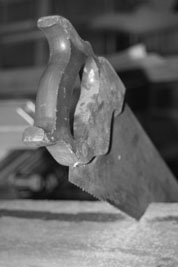
You've got a solid idea here. Unfortunately, the image as submitted is so small I'm afraid it might not do as well as it could. Good use of depth of field. Title distracts from overall shot as the teeth of the saw don't appear to be in sharp focus, but this could be a result of the size of the submission.
The saw does not invoke a sence of technology in this presentation. Ultimately the image is too small to seriously consider anything beyond teh most obvious that this is a picture of a saw, well framed in the given space, but somehow lacking in the presence to be of artistic or journalistic interest.
This is an interesting composition, but the actual size of the JPG is hurting you here. I think given a larger version, your score would have been a point higher on average. I commend the effort and the DOF (depth of field) is quite nice. The context of what appears to be a table saw in the background should be more prominent, to show the contrast between the new and old methods of sawing.
small photo too.
resize to 640 or so on the longest dimension - change the image quality when saving to lower the file size to just under the 150KB limit.
many image editors have a 'save as for web' or similar option which makes seeing the file size, and adjustments easy.
Small teeth and small picture. Try resizing to between 600-640 px on the long edge to really bring out those details. Otherwise well exposed and relatively sharp.
This is reasonable composition to me. The focus looks poor somehow. I think it should have been on the foreground most extremity (the handle.) Perhaps adding more space to the left to move the saw out of center would accentuate it's perspective and size better also?
too small, hard to tell, but does not appear to be sharply focused.
When you are done editing, resizze to 640 on the long side (or 600 if vertical, like this shot) and then do any sharpening (USM 150%, .3, 7 as a starting point). Ignore DPI. Then when you save it as a JPG use the quality or compression setting to get the file size to 147k or less.
this is pretty cool. I like the composition, and the blurred background. however, the picture is very small (I'm sure you'll get many comments like that). next time, take advantage of the full picture size allowed by the rules!






 Add photograph to your favorites
 Add photographer to your favorites


 Photographer found comment helpful.


