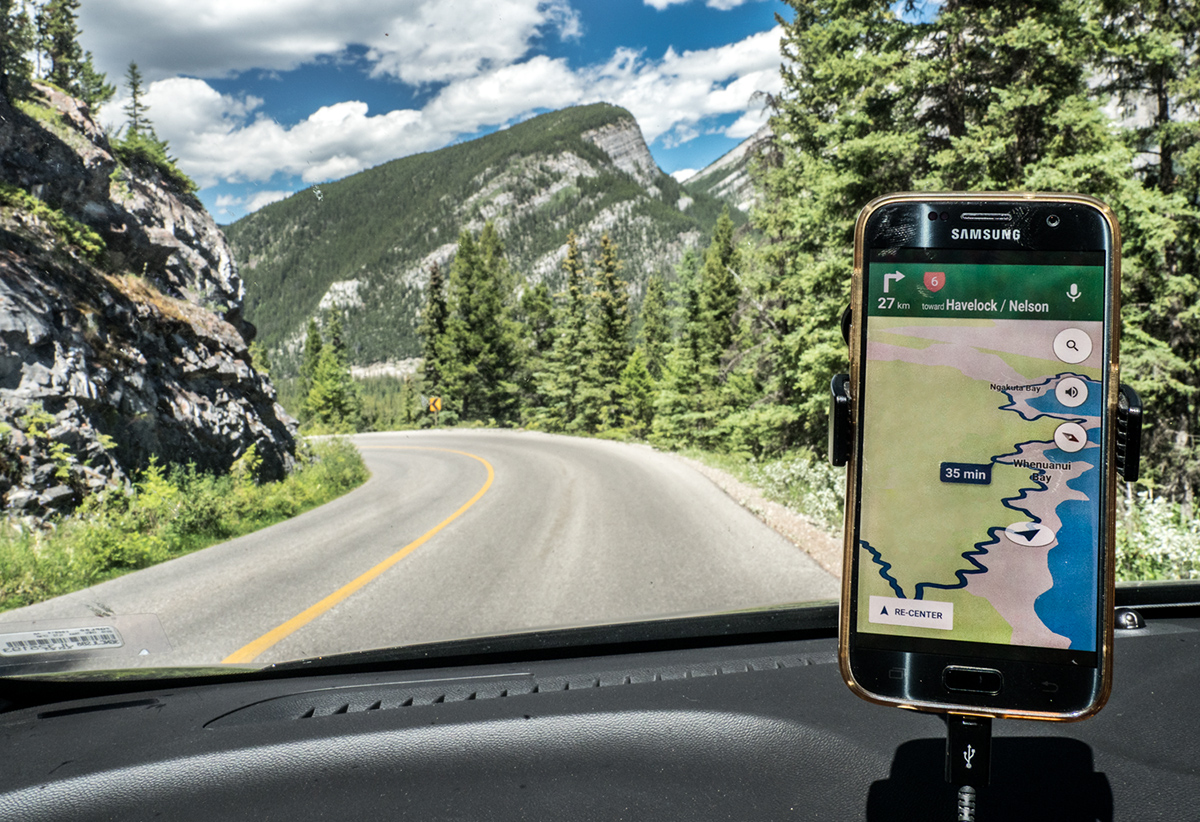
To implement this idea, I needed to find a seriously winding road in Banff where I was for a conference last week. However, while there were some nice serpentine section of some back roads, they did not look particularly striking on Google maps. So I decided to cheat a little bit and display a different road on my phone screen. However, it turns out it is not easy to make Google maps pretend that you are navigating in a different location, at least I was not able to figure out how. But last year in New Zealand we drove on one pretty amazingly winding road towards Abel-Tasman national park. The GPS screen looked so cool that I took a photo of it. So now I just cut a screen portion from that old shot and displayed it on my phone. Voila!
When I shared this photo with my DPL team (Wild Things), my teammate Ursula spotted this cheat right away, but she knew I was in Banff, and my screenshot certainly wasn't Banff. But I hope nobody else will catch me. Will see )).
Statistics
Place: 98 out of 126 Avg (all users): 5.1494 Avg (commenters): 7.0000 Avg (participants): 5.1143 Avg (non-participants): 5.2941 Views since voting: 433 Views during voting: 132 Votes: 87 Comments: 2 Favorites: 0








 Add photograph to your favorites
 Add photographer to your favorites


 Photographer found comment helpful.
