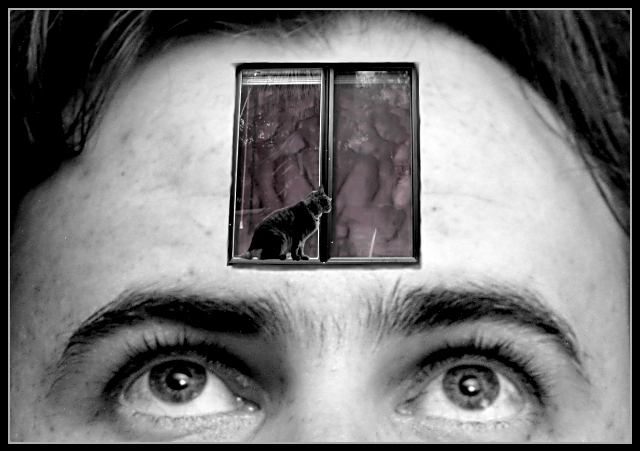
I took 3 photos - the forehead, window and cat - separately, and found a picture of a brain. I combined these in the Gimp on separate layers. The most important editing work I did was to use the eraser tool on less than 50% opacity to erase the glass from the windows but leave the impression of the reflection on the glass. I also painted some shadows onto the brain!
Statistics
Place: 61 out of 86 Avg (all users): 5.4255 Avg (commenters): 5.9286 Avg (participants): 5.2727 Avg (non-participants): 5.7857 Views since voting: 1199 Votes: 94 Comments: 18 Favorites: 0
A very cool idea, which I also think could use some tweaks as others have suggested.
One technique I've used for helping composite images is to use a soft-edged mask (or feather the selection) before you copy the image you are transferring.
For the glowing kitty, you might try either using the burn tool on the fringe or (my preference) applying a tone curve to just the kitty's layer to soften that highlight a little.
I guess I don't mind the softness on the face -- I see it somewhat as a fancy frame for your smaller composition.
Thanks Mag. I do understand the sharpness problem (as I said in my comment). The white edges... I understand how it looks, but the ones around the cat are really where her fur made her edges fuzzy, and I left them there because without them she looked a bit weird. There are also white edges on the inside of the window frames because they're there in the photo. I smudged the life out of all the other edges in the image with Gimp's little smudgy tool. I like your other suggestions. If I do have time I will definitely try it again!
By the way, I had the idea of putting windows on a face, although I thought of replacing the eyes. Exposing some brain was Annida's suggestion, and I love it :).
OK, I'm going to be brutal about what I think would make this better, but please don't take it personally because I think this is a great concept with much imagination.
A) the photo of the person needs (implied imho) to be sharp.
B)the cutouts of the window and the cat should not have any white edges. That destroys the illusion to a degree. The cat is a nice, sort of Monty Python-esque touch :).
C) If possible in your image editor curve the window so that it appears to follow the contour of the forehead somewhat.
D) Raise the brightness and saturation of the brain, for more contrast with the black and white, and more visibility.
I hope you try this again, and if you do, let me know!
The soft focus on this was due to my model not holding his head still while I used a fairly long exposure, because I was shooting indoors with just the room lights and an ordinary lamp. I don't own lots of lights, but I didn't want any major shadows on his face, so I had to shoot indoors. I also didn't have time to reshoot once I saw that the focus was soft (I couldn't see that on the LCD screen). I was too busy that week. So I did the processing and submitted. I'm happyish with how it went. I thought I'd get some more amusing comments though :P.
cool shot. i think i would have liked it a little better without the cat. the reflictions in the window are a little distracting. great concept, though!
If the original photo was a little clearer, this might have been a little more suitable. The difference in focus for these 2 pics really makes it look fake. Obviously it is, but the illusion is not pulled off really well - Inspzil
having the face blurred in this case is acctually helpful... then the clarity of the window helps draw the viewers attention there... the only problem for me is the contents of the window... guess I have a closed mind hehe
I like creepy as much as the next guy (or gal as it is), but this really creeps me out. However, I like the b/w, with the touch of color. Very cool brain matter.





 Add photograph to your favorites
 Add photographer to your favorites


 Photographer found comment helpful.


