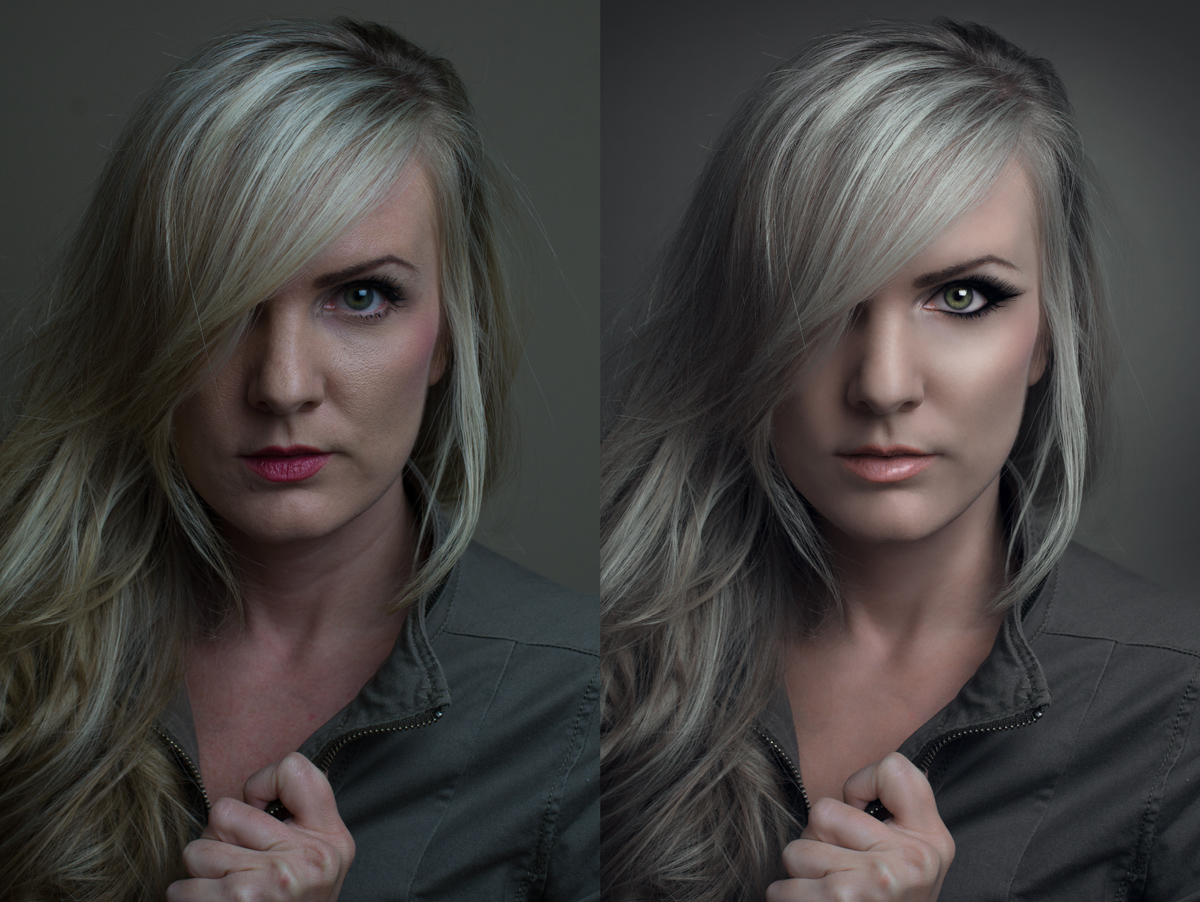
I love looking at real before and after work. It's how I learned a lot of what I know in terms of editing portraits. Which is something I love to do. There isn't a whole lot of it out there since Photoshop is always a source of contention and controversy. Some people like it while others feel it masks the truth. I'm the latter of those two. :) I enjoy photoshop (obviously) as I believe the ability to make someone look like they belong in a magazine is good for self esteem. I've had more than a number of people ask me for portraits and headshots of themselves, and along with my regular families/babies/engagements/maternity shoots.... Heashots/fashion/boudoir and portraits make up a good portion of my photo side business.
I know some of you will think this is "overdone" and some will like it as is. Whenever I'm editing portraits I always strive for "magazine" quality, and I know to some of you, even that is "too much". Some have made comments such as this already, but I believe, in part, it's this site that softens photos just a bit, because some of you overuse the "unsharp mask" (in my opinion) :)
If you view this on other sites you'd be able to see more details than what this site is displaying.
As for the actual tutorial, I was impressed by the number of comments I got asking for it. I didn't initially intend to create one.... This was just what I wanted to title it.... But I also realize that many of you do want to learn how, and who would I be if I did not "pay it forward" since I learned myself from online tutorials and others who were kind enough to take the time to post tutorials online.
So, if you are interested, please let me know!! I'm trying to figure out the best way to possibly do a tutorial that is most helpful, so suggestions are welcome. Live Skype session and I share my screen and you can all follow along either with my "before" or your own? Or YouTube tutorial? (Neither of which I've ever done before) :) or just a simple written one?? There are many options.... Those who are truly interested....... Let me know!!
Update for DQ: Well I definitely don't agree, but it is what it is. :)
You may not use ANY editing tool to create new image area, objects or features (such as lens flare or motion) that didn't already exist in your original capture.
SC deliberated on this image quite a bit, but eventually decided that the make up constituted an additional feature, especially around the eyes. While a great exmple of can be done in processing; however, we feel it crosses the line in terms of the Advanced editing ruleset.
Statistics
Views since voting: 2238 Views during voting: 419 Comments: 34 Favorites: 6 (view)
I don't agree on the DQ on this image at all. I feel the features were enhanced.....not necessarily added.....that line which is crossed with editing is different for everyone.....unfortunately.......thus it remains a gray area, and can always be disputed either way.
Harsh!
Skin smoothing, tone shifting I see; adding make-up I do not see.
There are no shadings present in the after that are not there in the before (emphasised or toned down some, but not created from nothing).
The eye lashes on her left eye towards the temple definitely were not there on the left shot, so this is added, and in my point of view the DQ is okay, considering the rules.
DQ or no DQ - I still think it's a great job that was done here, and a nice take on the challenge topic.
hummm I don't agree with the DQ, It's the quintessential before and after portrait shot! Ask any 40+ lady what they want, truth or PS... I know I'll pick PS EVERY TIME!!!!
Harsh!
Skin smoothing, tone shifting I see; adding make-up I do not see.
There are no shadings present in the after that are not there in the before (emphasised or toned down some, but not created from nothing).
wait, if they mean the dark mascara-like like, that already exists, she is wearing make-up, it just may not have been 100% completely across the eye, but it was there. mon dieu, this sucks!
I was really hoping to see the tutorial process in your notes based on the title.
I think the most effective way of doing this tutorial would be a series of "before/during/after" screenshot images with notes, hosted in the "how did they do that" section of the site.
As for the image, I scored it an 8 and think it's a great example of what can be done in the advanced rule set.
What I would be interested in the most would be your editing software (also an actual tutorial on your steps that you took to achieve this)...well done and congrats!!!
Though not an overly huge fan of the 'poreless perfection' school (witness pics of Julia Roberts, who is at least my age if not older) still skin-smoothed to her Pretty Woman days in Cover Girl ads.
If nothing else I want to learn HOW to do this, even if I end up rarely using it.
Anyhoo Congrats on the red, and I'd like my tut written, please! :-)
Johanna, this was literally after a full day of work and after the gym. I wasn't sure what direction I wanted the color scheme to go in and it was the first color I put on just so that I had SOME lip color. :) during processing I chose a dark eye and a light lip, per regular makeup rules ;)
Nicely done processing on the shot - has a 'femme fatale' vibe to it, especially with the way you made the eye look. I get the feeling her other hand is holding a .357 magnum or the trigger to a bomb.
A nice tutorial on how to post-process a portrait...although a little too over-cooked for my tastes. The skin looks unrealistic/plastic (needs some texture and pores for realism), and the eye is over-sharpened. You've made yourself look like a mannequin. Probably 2/3 of this effect would have been ideal.
Looking forward to the tutorial; however, I am afraid that it will take a lot of pp to make this old person look anywhere near your beginning image much less th e final, lol.
Ok Sam, I hope you're ready for the flood of requests on how to do this...so I hope you're ready! If I'd known just a fraction of what you and Christophe know, I wouldn't have to fall back on stuff like high-key to make me look half as good :-)
Sooo...tut, please! ASAP!! And grats on the new job, hope it's better than the old one.





 Add photograph to your favorites
 Add photographer to your favorites

 Photographer found comment helpful.


