This took a bit of work, mostly to clean up, since my BRAND NEW CAMERA (yay!!!!) gets a bit noisy at night.
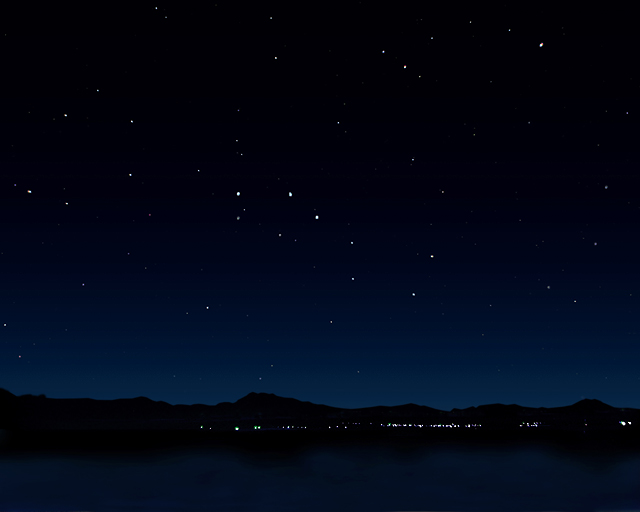
First of all, this was taken at a nearby marina, looking north. The small town across the lake is, I believe, Newton, Utah. All of those stars really were there, and this is the sky we see in our little apline valley. Sometimes we do get some smog, but not on this night, thank goodness! You folks from the city are always welcome to come and visit and gawk at the stars when you come.
Steps:
I first skewed the image, since my wide angle lens (almost a fisheye) warped it considerably. I selected about a third of each side, and skewed it down so the horizon was straighter.
It was dark, so I lightened it. There was way too much noise with any ISO over 100, so it did appear darker, and as I shot, I fully expected to be lightening and cleaning a lot.
I next created three new layers: Ground, Sky and Stars. On each later, I eliminated everything but the subject for which it was titled.
In the Stars layer, which only had stars, I increased their brightness a little by using Levels and sliding the right slider to the left. I also selected the Big Dipper and Polaris, and repeated the process, making them slightly brighter.
In the Sky layer, it was mostly cleaning and smoothing. I also shifted the colors so it was a bit more blue and more like it was when I saw it.
The Ground layer, which included the lake, was all strangely colored, mostly due to an obnoxious orange street light in the marina parking lot behing me. It gave the lake itself a bizarre, ugly, orangey brown color. So I selected the water and color shifted it toward the blue, then desaturated it until it looked good with the sky. This was my most digitally questionable thing I did, but quite frankly, the water was just plain ugly and the camera picked it up strangely.
The lights of the small town appeared weird, so I moved them down with the clone tool a tad. This also may be considered too digitally manipulative, but I feel it vastly improved the image. My wife encouraged me to eliminate the town lights altogether, but I felt that this action would be going to far, so I opted to simply shift them down. After all, when I shot the photo, I wanted to create an image with the town and its sky as subject. A fair compromise, I hope.
I flattened the layers, fixed a few other minor problems, and resized, then sharpened, which to my surprise doubled the number of stars in the sky, and brought out their fun colors.
Enjoy!
Statistics
Place: 26 out of 182 Avg (all users): 6.3106 Avg (commenters): 8.3158 Avg (participants): 6.0531 Avg (non-participants): 6.5492 Views since voting: 1661 Views during voting: 422 Votes: 235 Comments: 22 Favorites: 5 (view)
I like the expanse of huge starry sky. There is a nice tension between the sky and the landscape at the bottom half of the frame. This almost looks like a book illustration rather than a photograph. Very nice.
The simplicity of the shot is fantastic. It almost seem fake.
I would try less compression for the jpg file to make the sky smooth, but I wouldn't degrade the pic because of that.
Well done
Very nice balance in a very low key shot! Gradiance on the horizon looks perfect, a truly optimal expose (lights not blown out, details showing). I bet there are a bunch of people willing to pay for this (would look great on your wall or could sell as an stock photo). Different from your typical DPC shot, I love it.






 Add photograph to your favorites
 Add photographer to your favorites


 Photographer found comment helpful.


