Challenge: Photograph Becomes a Painting (Expert Editing)
Camera: Canon EOS-50D
Lens: Canon EF-S 15-85mm f/3.5-5.6 IS USM
Date: May 12, 2013
Aperture: 16
ISO: 100
Shutter: 4
Date Uploaded: May 12, 2013
|
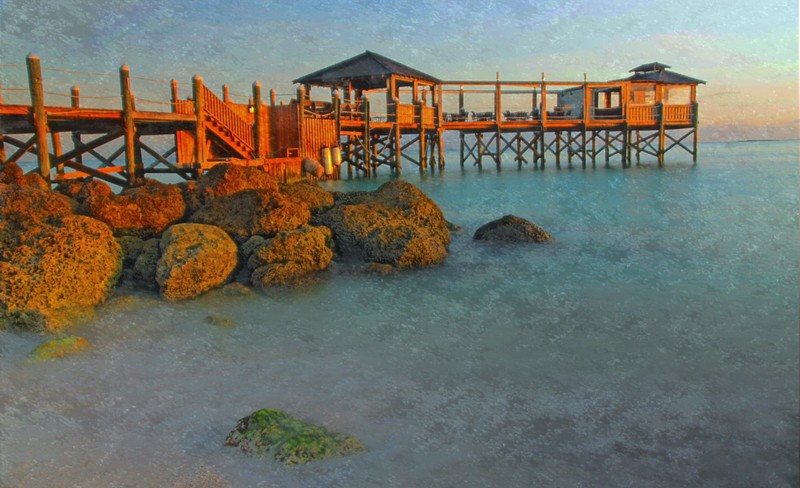
This is the main pier at Sandals in the Bahamas. I was out early in the morning when the waves were enough to create a smooth effect with a long exposure. The light from the rising sun hit the dock perfectly to give it an orange glow, and gave the water it's turquoise coloring.
As I'm on vacation without my laptop, all editing was done on my iPad with an app called Laminar Pro. The lack of total control was tough to deal with. This app has some nice features, but it's no computer application. For instance, cloning turned out to be a series of clone brushes followed by a series of smudge brushes. This would never work for any detail work.
Editing steps:
* crop
* clone out two poles and a dust spot
* increase saturation
* increase highlights
* add an effect called comic book with boost saturation and gives hard lines to the edges. This layer is at 91% opacity
* add an effect called water painting with gives the brush stroke styling a via a texture. Then I upped the brightness of this layer, and set opacity to 75%
* save as jpeg
I definitely like the end result, but would have loved a laptop for this. |






 Add photograph to your favorites
 Add photographer to your favorites


 Photographer found comment helpful.