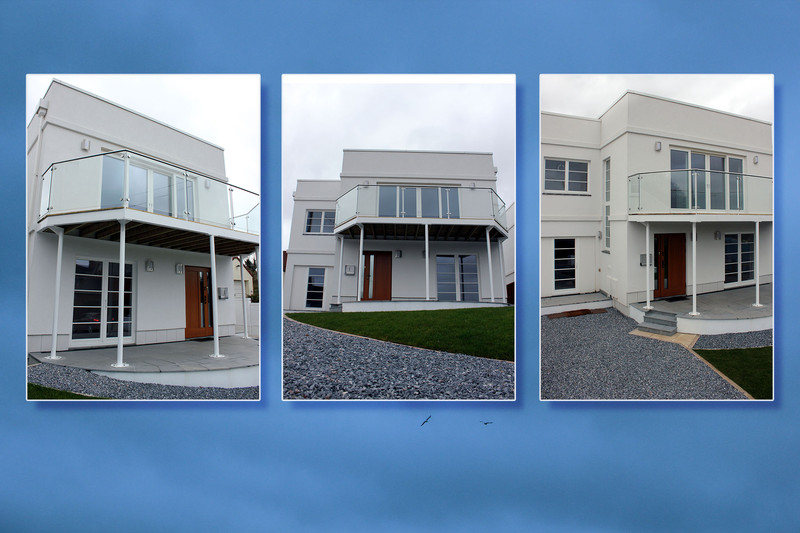
This was my first major photographical project concerning editing. The subject in the pictures is a house down my road.
The steps that I used for creating the final picture:
1. Choose the 3 pictures you wanted to use for the triptych 'collage' and chose the background that you want.
2. Open each photo as a different project in Photoshop CS6.
3. Using the crop tool, crop all of the photos (except the background) to a 5x7 ratio.
4. After having done this, copy all 3 pictures into the background project and aligned them accordingly.
5. Horizontally flip the 1st and 3rd photo.
6. On the first photo, add in a 'Drop Shadow' found in the 'Layers Style'. The drop shadow was set on Overlay (with minimal Opacity and Noise). Then add a 'Stroke' and set it to an outside position with a normal Blend mode.
7. Repeat for 2nd and 3rd photo.
8. Select the layer for the background and do cmd+j or ctrl+j to duplicate it.
9. Set the duplicated layer to 'Overlay' - This will make the overall background darker and tweak colour to personal preference.
10. Finally, add a new 'Colour Balance Layer' under the 'New Adjustment Layer' in the Layers section and alter the colour balance to give the overall picture a warmer feel.
Using these steps, I created my image.
Enjoy
Statistics
Place: 62 out of 67 Avg (all users): 5.0333 Avg (commenters): 4.0000 Avg (participants): 4.7879 Avg (non-participants): 5.1754 Views since voting: 543 Views during voting: 210 Votes: 90 Comments: 2 Favorites: 0





 Add photograph to your favorites
 Add photographer to your favorites

 Photographer found comment helpful.

