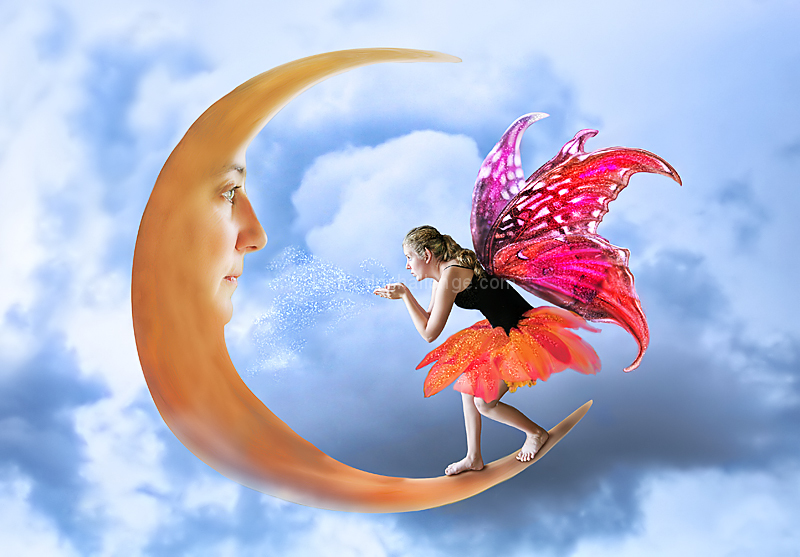
Post: For pgirish007 who asked for a tutorial. There are probably as many ways to accomplish this image as there are photographers. There's no right way or wrong way.
I'm not good at tutorials, but here are my basic steps.
Shoot the girl, the face for the moon, a butterfly for the wings, a flower for her skirt, and the sky. Keep in mind the light source direction for each when shooting, if possible.
Use the magnetic Lasso tool to select each of those out of their backgrounds and drag the whole image (not just the cutout) onto the sky background. Create a mask to clean them each up.
Use the Liquify tool to distort the butterfly wings, the face, and the girl's ears, each still on their separate layers.
Dodge and burn and use Overlay Paint brush to color wings and flower skirt.
Burn for shadows.
Adjust each layer to match the others in brightness/contrast/levels/saturation, etc.
Tweak the images until you're too tired to tweak any more... :D (Such as making the bottom of the moon a bit transparent to look like a cloud in front, when it's really just painting some of it out at reduced strength on the moon mask).
I usually do a bunch of Saving and Snapshotting so when I don't like what I've done, I can go back to where I was without trouble.
MASKing is a MUST for any Photoshopper. Learn masks and the world is your oyster. :D
Statistics
Place: 7 out of 74 Avg (all users): 6.7661 Avg (commenters): 8.1429 Avg (participants): 6.2927 Avg (non-participants): 7.0000 Views since voting: 1720 Views during voting: 341 Votes: 124 Comments: 23 Favorites: 3 (view)
HI LYNDA..... I SURE I WROTE A COMMENT BELOW THIS IMAGE RE THIS CHALLENGE BUT IT HAD DISAPPEARED AND I HAVE NO IDEA WHY...
I GAVE YOU MY SHERPET 'YELLOW' AWARD OF EXCELLENCE... I MUST NOT HAVE EDITED IT PROPERLY SOMEHOW AND SO PLEASED I SAW IT IS NOT HERE, AS I AM ADDING IT NOW... LOVE THE FANTASY FEELING THIS ONE HAS AND ALSO THE IDEA AND EXECUTION... WELL DONE... REALLY LOVED IT XOX FROM SHEZ
SHERPET 'YELLOW' STAR AWARD OF EXCELLENCE
Daytime Games by LydiaToo






 Add photograph to your favorites
 Add photographer to your favorites


 Photographer found comment helpful.