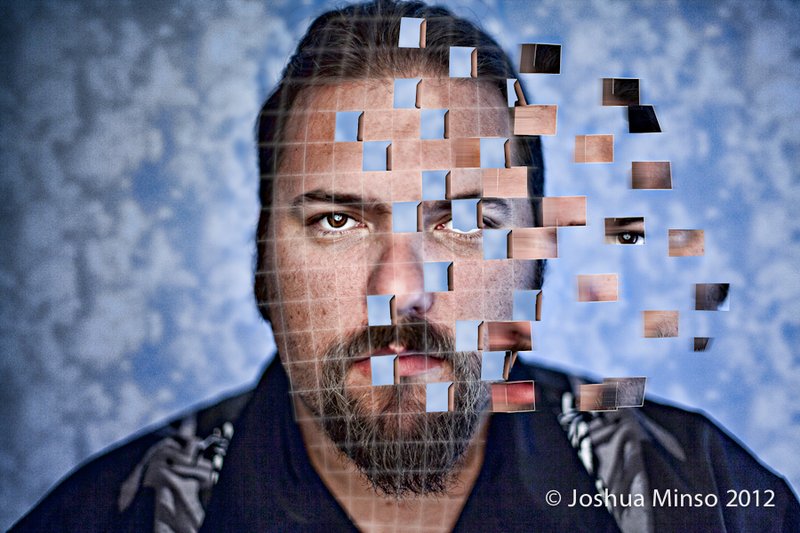
What affect or tool is it? Or have you selected them individually and done it that way, I'd have liked to have seen bloody flesh underneath not the background :)
I used the pen tool to create a path which I filled with the bg color. Selected the portrait layer to copy and paste the selection and moved it over. I have just been looking for tutorials to follow mainly, trying to learn some new ps stuff.
Originally posted by MagicTrix:
Neat effect. Just curious, how long did this take you to process?
This took far too long to process as I kept messing up, in all about 4 hours and I still wasn't completely happy with it.
What affect or tool is it? Or have you selected them individually and done it that way, I'd have liked to have seen bloody flesh underneath not the background :)
Only because I'm assuming this is for learning, I don't like how the grid doesn't wrap around the chin, like it would if you were to draw it on. I'm sure this is infinitely harder to do, especially with the chin scruff you're sporting, but you nail that, and this becomes a near flawless photo in my opinion.
Also, why do the cutout remnants in the face all have the same artifact on the right of them? I would have (reminder: I probably will never be able to do this) taken a photo of the background and used the cutout piece from the exact spot on the background.




 Add photograph to your favorites
 Add photographer to your favorites

 Photographer found comment helpful.


