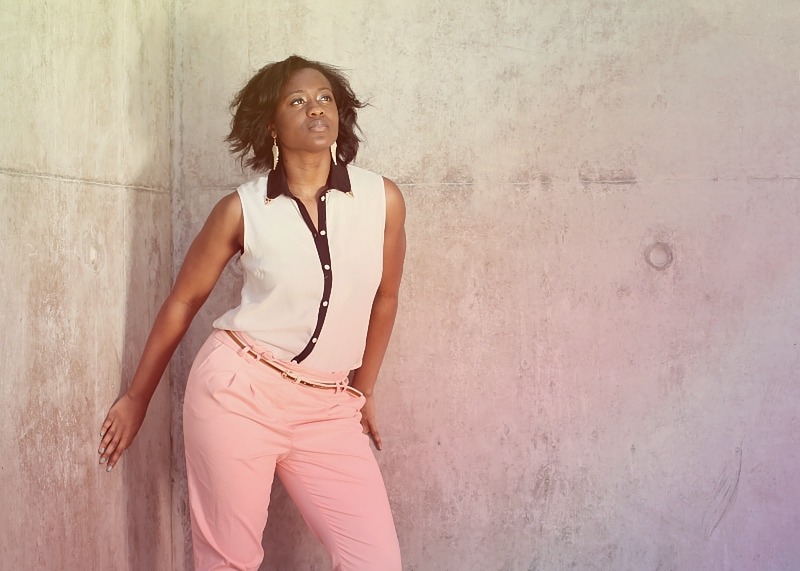
Ok , decided to try another modelling shot even though I haven't had alot of luck with them on this site in the past lol, but i liked this one of Pearl (the model).
Editing was as follows.. (corel paintshop pro x4).
Straightened the image, cropped, cloned out a couple of blemishes on the models skin at her neck, adjusted curves, adjustment layer for hue/saturation/lighting, adjustment layer for brightness & contrast, created a new layer and filled with a blue to lighter blue gradient (corner to corner), set properties of this layer to "lighten" and 30% opacity, created another new layer and filled with a yellow to red gradient (corner to corner), set properties of this layer to "darken" and 30% opacity, merged both these new layers together and set properties to "hard light" and 65% opacity, adjusted brightness and contrast of main photo layer using levels, selected sunlit corner of wall and adjusted brighness and contrast to closer match the rest of the wall, merged down all layers, resized for challange and sharpened using topaz sharpen.
Statistics
Place: 244 out of 279 Avg (all users): 5.1311 Avg (commenters): 3.0000 Avg (participants): 5.1059 Avg (non-participants): 5.1892 Views since voting: 277 Views during voting: 208 Votes: 122 Comments: 1 Favorites: 0





 Add photograph to your favorites
 Add photographer to your favorites


 Photographer found comment helpful.