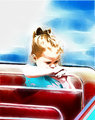
Taken for the Children speed challenge, I got everything all wrong. Not a shot to be saved, except maybe this one. See what - if anything - you can do to make this shot terrific.
Super advanced editing rules. Pull out all the stops!!
How do I get a hold of the image? Can't seem to save or copy it at all. Rookie question, but yeah... a little help.
do a print screen, and paste it into what ever editing software that you use. if its ps, make a new layer/image. it should be about 800(wide)x600(tall) you have to do a little cropping...
Then edit away!
btw, have the whole image up first, then print screen(this is a key and should be some where in the top right corner.) and if you cant see all of it. press F11 to make the window full screen, then F11 again to exit full screen mode.
How do I get a hold of the image? Can't seem to save or copy it at all. Rookie question, but yeah... a little help.
do a print screen, and paste it into what ever editing software that you use. if its ps, make a new layer/image. it should be about 800(wide)x600(tall) you have to do a little cropping...
Then edit away!
btw, have the whole image up first, then print screen(this is a key and should be some where in the top right corner.) and if you cant see all of it. press F11 to make the window full screen, then F11 again to exit full screen mode.
It's even easier than that: open the image, and see on the left, near the bottom of the data, "view full size image"? That one's 1000 pixels wide, and it's the one you want to use. Right click on it and save it, or copy it and paste into photoshop.
How do I get a hold of the image? Can't seem to save or copy it at all. Rookie question, but yeah... a little help.
do a print screen, and paste it into what ever editing software that you use. if its ps, make a new layer/image. it should be about 800(wide)x600(tall) you have to do a little cropping...
Then edit away!
btw, have the whole image up first, then print screen(this is a key and should be some where in the top right corner.) and if you cant see all of it. press F11 to make the window full screen, then F11 again to exit full screen mode.
It's even easier than that: open the image, and see on the left, near the bottom of the data, "view full size image"? That one's 1000 pixels wide, and it's the one you want to use. Right click on it and save it, or copy it and paste into photoshop.
R.
Becuase that doesn't always work. thats kinda why i suggested my way... :)
.... I tried a lot of things because the image is quite charming. Don't know if you'll like any of them. What I feel like doing is getting out my pencils.
Thank you all so much for playing!! I've left comments on all your entries. And thank you alans_world for your kind words on my original :-)
I learned a LOT from seeing the image through your eyes. I think the shot without the other figures emphases her isolation, while including them adds an interesting story element. Softer processing makes it dreamier and more positive, darker/harsher choices make it more onerous and sad. Thank you all for playing!