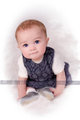
Thanks, Ken! All of it was done by hand, no auto anything. Mostly using blending and cloning brushes. A little dodge and burn and some straight up painting. Now we need a Expert Editing challenge! :D
Great job Cindi. I recently picked up a copy of Painter and a Wacom tablet and have been playing around with it but no results like your as of yet. I've been trying landscapes for the most part and starting out leting it autopaint for a bit and then stopping it to do manual touch up. Have not tried a full manual painting as yet. There is a lady who teaches out your way named Fay Sirkis who I took a class from at the Vegas Photoshop World event last month. She made it look so easy I had to give it a try.
She is VERY good and like I said, makes it look easy. She was an oil painter before becoming allergic to the chemicals in paints causing the switch to digital painting. You should see what she did with some wildlife portraits! In any case she also sells DVD’s through NAPP that include training and custom brushes.
Eventually I want to take one of her multiday classes she offers in California, Florida and NY.
She should give me a commission for all this plugging!
There are also two other artists/photographers I know of teaching conversion of photos to paintings using Corel Painter and they both have CDs to purchase explaining their techniques.
Marilyn Sholin is located in south Florida gives workshops around the US, Canada and overseas (but mainly in FLA), as well as, has tutorials posted on her web site. She's quite accomplished, as is, Helen Yancy who gives 2 or 3 day courses out of her home in Michigan, but also sells CDs teaching her methods. There's also the smudge tool technique of painting photos that you can read about HERE.
There are also two other artists/photographers I know of teaching conversion of photos to paintings using Corel Painter and they both have CDs to purchase explaining their techniques.
Marilyn Sholin is located in south Florida gives workshops around the US, Canada and overseas (but mainly in FLA), as well as, has tutorials posted on her web site. She's quite accomplished, as is, Helen Yancy who gives 2 or 3 day courses out of her home in Michigan, but also sells CDs teaching her methods. There's also the smudge tool technique of painting photos that you can read about HERE.
I am familiar with Marilyn, it was her book I picked up this week and started working through the lessons. Ive heard Helen's name too, PPA, I think? I'll have a look at those links. Thanks. :)
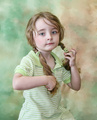
Adding one more. I actually did this one before the baby pic, but didn't like it. This morning I messed with it a bit more and its getting closer to being a keeper (I think). :)
Have to say I prefer the photos. :( Personally, the painted photo effect now seems very artificial to me. I've done quite a few of them myself, so I'm also speaking as someone who understands the process.
Have to say I prefer the photos. :( Personally, the painted photo effect now seems very artificial to me. I've done quite a few of them myself, so I'm also speaking as someone who understands the process.
While I don't necessarily disagree with you, Louis. I think as photographers we have to continue to offer our clients things they cannot easily acquire themselves. With cameras getting smarter and cheaper, our clients don't value our work the way they once did since many feel they can create suitable photographs themselves. Offering them digital paintings is just one more thing I would like to add to set me apart from the other shooters in my area and its something a client cannot easily do on their own. It has been proven that many clients value the paintings. Again, look at the pricelist here: //www.faysartstudio.com She obviously has a market for her work and clients that value what she offers.
I painted years ago, so to me it feels like coming full circle. :)