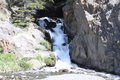
I love shots of moving water. I started playing with my manual settings and finally figured out how to capture the water they way I like it. But I can't figure out how to get rid of the bright spots in the scenery around the water. I tried different ISO settings (100-200 range) different f stops (f18-f22) and different shutter speeds. I was also using a polarizing lens filter on my camera. The day was slightly overcast. I keep getting the same result....part of the image is too bright. The image above is straight from my camera, I just resized it. Please help!
Anywhere you get strong contrast you're going to have a problem. If you expose for the shadowed area, highlights are going to be blown. As far as I know, the only way is solve it is to avoid it. Either wait until more of the area is in shade or find a way to get more light into the dark areas.
Then again, what do I know? Hopefully some who DO know will have some great hints that I can steal use as well :)
What your seeing is the usual problem with bright sun and shadows. It looks like your camera captured enough detail, but you may need to use some HDR tricks to bring the dynamic range into one image. I would try the following on it:
-Adjust curves in the RAW converter to bring down the overly bright areas
-2 separate RAW conversions for highlights and shadow, then layer and mask
-Convert with Photomatix, or another HDR utility that can bring in more of the dynamic range from one RAW file.
I'm going to see what I can do with your existing image.
You want to try taking your photos at the same time you would go fishing. Dawn or dusk. The problem you are having is with the harsh light. Taking it on an overcast day may work too. Love the long exposure look on waterfalls.
You definitely have the image detail there, A quick run over it with levels, curves and Topaz adjust brings out a lot of detail from it.
I think all you need a some PP tricks to bring it out. Are you shooting in RAW?
That looks beautiful! I'm not shooting in RAW but maybe I should. Does that make a big difference in pp? I will try your suggestion of using different layers for different adjustments. Thanks a bunch!
What you really need for this sort of work is a set of neutral density filters. No amount of PP is going to change hwo the brightest part of the water here is utterly blown out. And, as Easton said, early light and late light are your friends for
this sort of work.
Thanks everyone. I was shooting in the middle of the day so I'm sure that was a big part of the problem. I'll try to get out more in the mornings and evenings. I really appreciate your comments and help! =)
Here's what I did with selectively editing the two sides separately.
Couldn't do much for the brightest areas of the waterfall, they were blown with no image detail. As Robert suggested, getting it right in the camera is always best. If you shot RAW, you may have had some detail from those areas, however. The JPG format throws out some image data.
Just FYI, this is the histogram I got on your image before editing:
So you have some blown highlights, and absent neutral density filters or waiting for twilight or a light overcast to even the the on-scene lighting, post processing will be your salvage tool. It may or may not be satisfactory;
Using basic editing of the entire image (highlight recovery, exposure, contrast, hi/mid/low contrast, I got this result:
Using nik viveza (you could use some other tool) to select areas and locally alter brightness, contrast, saturation, I got this:
I brought the left side down, boosted contrast. I did a similar thing on the highlights on the right side cliff wall. I desaturated the water itself, to kill a little blue and make it more evenly white. And, I boosted the deep shadows a bit at the top center.
I didn't play much with color/tone/saturation at all, as you can see. It was a pretty quick edit.
I have to say I am impressed what the 50D was able to get from that scene, even in JPG. I don't think my 350D would do that well in that harsh lighting.
Exposure bracketing and some HDR could also help if you are anticipating such difficulties with the scene when you shoot it.
What you really need for this sort of work is a set of neutral density filters. No amount of PP is going to change hwo the brightest part of the water here is utterly blown out. And, as Easton said, early light and late light are your friends for
this sort of work.
What you really need for this sort of work is a set of neutral density filters. No amount of PP is going to change hwo the brightest part of the water here is utterly blown out. And, as Easton said, early light and late light are your friends for
this sort of work.
R.
What R. Said...
Agree as well.
Without a set of neutral density filters I don't think this shot is possible at time you took it (1:32 PM). The only other thing you could do is take at least three photographs at different exposures, for dark, midtones, and highlights.
Robert is absolutely right. Post-processing is not the solution, not in the least. Good post-processing tools and skills are wonderful to bring out the best in each picture, but you need a good shot to start out. IMHO, if you have a shot like the one you posted at the start of the thread, yes, you can try this and that in post-processing, but it is going to LOOK post-processed, and it will rarely have the same impact as a well composed/shot at the right time picture.
What others have said here also is true. The issue is the bright light/shadows that you have in your photo, it is simply too harsh a light and too great a difference between light/shadows for the situation to work. Shooting at dusk/dawn is great. Or, shoot when it's raining (drizzling is better), AND use that polarizer (much more so in rain/drizzle than in sunshine). Wet conditions bring out all sorts of beautiful, gentle colours in rocks and vegetation, complementing flowing water just right quite often. The polarizer cuts down on glare and enriches, saturates, the colours. And, since light will be much less brighter either at dusk/dawn or in cloudy rainy conditions, you often won't even need a neutral density filter.
Robert is absolutely right. Post-processing is not the solution, not in the least. Good post-processing tools and skills are wonderful to bring out the best in each picture, but you need a good shot to start out. IMHO, if you have a shot like the one you posted at the start of the thread, yes, you can try this and that in post-processing, but it is going to LOOK post-processed, and it will rarely have the same impact as a well composed/shot at the right time picture.
What others have said here also is true. The issue is the bright light/shadows that you have in your photo, it is simply too harsh a light and too great a difference between light/shadows for the situation to work. Shooting at dusk/dawn is great. Or, shoot when it's raining (drizzling is better), AND use that polarizer (much more so in rain/drizzle than in sunshine). Wet conditions bring out all sorts of beautiful, gentle colours in rocks and vegetation, complementing flowing water just right quite often. The polarizer cuts down on glare and enriches, saturates, the colours. And, since light will be much less brighter either at dusk/dawn or in cloudy rainy conditions, you often won't even need a neutral density filter.
I hope this helps.
It's very helpful, Ursula. Thank you. I wouldn't think to use a polarizer in the rain/drizzle. Will have to try that. So let me ask, can you use the neutral density filters and the polarizer at the same time by stacking them?
What you really need for this sort of work is a set of neutral density filters. No amount of PP is going to change hwo the brightest part of the water here is utterly blown out. And, as Easton said, early light and late light are your friends for
this sort of work.
R.
What R. Said...
Agree as well.
Without a set of neutral density filters I don't think this shot is possible at time you took it (1:32 PM). The only other thing you could do is take at least three photographs at different exposures, for dark, midtones, and highlights.
Thanks for the tip about taking several photos at different exposures. Sometimes I want a shot and it isn't possible to be there at the right time of day, so this would be very helpful.
I have to say I am impressed what the 50D was able to get from that scene, even in JPG. I don't think my 350D would do that well in that harsh lighting.
Exposure bracketing and some HDR could also help if you are anticipating such difficulties with the scene when you shoot it.
I just got my 50D and am super impressed with it. Thanks for the tip about exposure bracketing and HDR. =)
Just FYI, this is the histogram I got on your image before editing:
So you have some blown highlights, and absent neutral density filters or waiting for twilight or a light overcast to even the the on-scene lighting, post processing will be your salvage tool. It may or may not be satisfactory;
Using basic editing of the entire image (highlight recovery, exposure, contrast, hi/mid/low contrast, I got this result:
Using nik viveza (you could use some other tool) to select areas and locally alter brightness, contrast, saturation, I got this:
I brought the left side down, boosted contrast. I did a similar thing on the highlights on the right side cliff wall. I desaturated the water itself, to kill a little blue and make it more evenly white. And, I boosted the deep shadows a bit at the top center.
I didn't play much with color/tone/saturation at all, as you can see. It was a pretty quick edit.
Thanks for taking the time to explain your pp steps. You did a good job with your editing.
The sun is a lot stronger than it ever was lately, not because the sun is getting more powerful, but the Earth's magnetosphere is weakening. Its tough in a bright day to get your slow shutter speeds to produce a good exposed shot with moving water. I have tried it and only succeed on cloudy days, but judging from your shots, I don't see any major problems with them, they are good, my only recommendation is to play with your center weighting and allow the Exp. compensation to do its job. Try decreasing the Exp. comp a few notches, hopefully reducing any over exposed areas.
I love shots of moving water. I started playing with my manual settings and finally figured out how to capture the water they way I like it. But I can't figure out how to get rid of the bright spots in the scenery around the water. I tried different ISO settings (100-200 range) different f stops (f18-f22) and different shutter speeds. I was also using a polarizing lens filter on my camera. The day was slightly overcast. I keep getting the same result....part of the image is too bright. The image above is straight from my camera, I just resized it. Please help!
In this particular case you've got too much light in the scene already, and it's harsh. Plus, the polarizer is not enough, try ND (neutral density) filter.