I have received comments about compression and am wondering how to avoid loss of texture/detail when resizing a photo - should I just shoot the photo in that size to begin with? i.e. since we have a 640 pixel cut off, just go with that from the get go...
Thanks,
Kerry
No, shooting in the 640px size will result in some very poor quality shots. You should shoot in the best quality possible, edit in the best quality possible, and the last step in your process should be resizing and saving for DPC.
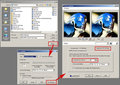
What software are you using? Here are some screenshots I have on hand showing how to do it in PaintShop Pro:
And Paint.net:
Added: You will always lose a little something when resizing down to challenge size. It's the natural effect of removing pixels. Sharpening helps fix some of that induced soft appearance, followed by the above mentioned compression adjustments when doing your final save.
Microsoft Paint has no facility to adjust compression. It's a pretty crude application. Not sure about Picasa.
Paint.net is an open source project that was started as an update to Microsoft Paint, but it took on a life of it's own and MS gave it wings. Some others may recommend GIMP, but I like Paint.net, because it is a little easier, but still has most of the functionality and a similar interface to the major image editors. You can find links to both of those and lots of other goodies in this thread. (I see the general beat me to posting the link)
I do use PaintShop Pro as my primary editor, but it is probably the #3 app as far as the number of DPC users, with Photoshop and Photoshop Elements as #1 and #2.