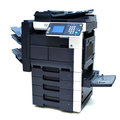
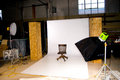
Usually with a white backdrop, and then adjustements to brighten it to a pure white. I did that with some shots for work. I bought a large roll of background paper at a camera store, suspended it from the wall to the floor, with a gentle curve in it, and then selectively adjusted to get rid of the shadows and inconsistent spots. Even lighting is the most difficult part of it.
I use at least 2 off-camera flashes. Point one at the backdrop and increase the flash power (or adjust aperture) until the backdrop is over-exposed, without spilling and washing out edge detail on the subject. Use the other flash on the subject.
Then it's a matter of balancing the lighting between the background and the subject to minimise shadows and get a nice even lighting across the whole backdrop
thanks folks - kinda guessed it would involve buying more stuff :-)
I found it was quicker and easier, and the results looked more realistic when I used the correct lighting technique, as opposed to Photoshop post-processing to remove the background.
tbh, I think my off-camera flash set-up cost about $50 or something. You can use cheap flashes and a couple of remote triggers. Check out strobist for a great intro to off-camera flash techniques. It changed my life ;-)
thanks folks - kinda guessed it would involve buying more stuff :-)
Not neccessarily. Since you are shooting Nikon, you might be using Nikon Capture NX to process your RAW files. If so, then you can very easily change the background using control points like I did here...
- - - - - - - - - - - - - - - background darkened to black - - - - original with cluttered background
This took only a few minutes to achieve with Nikon Capture NX. I would imagine that the background could have gone the other direction to white also, and maybe even to a colored background although I haven't tried that yet.
If you are not using Capture NX then you might want to consider getting this extremely powerful program. Capture NX2 is out now and I'll will be upgrading to it very soon.
I found it was quicker and easier, and the results looked more realistic when I used the correct lighting technique, as opposed to Photoshop post-processing to remove the background.
Agreed. The above copier pic was a good effort, but would have been easier with better lighting. I used a combination of on camera flash, bounced from the low ceiling, and the fluorescent lights that were already in the room. I had reflectors to the right and left of the copier. It still took some editing to get the background to this state.
You can always do still life photos that are smaller in scale with a large sheet of paper.
All of these were shot with a piece of paper no bigger than 24" x 36". The two apple shots were window lit with a white piece of paper for a reflection.
>>>
Not neccessarily. Since you are shooting Nikon, you might be using Nikon Capture NX to process your RAW files.
<<<
Nice, I've tried Capture NX kinda found the control points to be a bit hit and miss, sometimes they work real good other times they just select circular areas. Presumably it worked for your example because there was very little green or black in the flower.
impressive though, I shall have a play around. Decent flash(s) and lots of carboard etc on the horizon though.