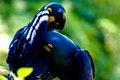
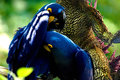
For a situation like this, I would try removing the noise at the highest resolution image possible. I think this image begs for use of a duplicate layer with some masking. Add a duplicate layer, perform the noise reduction on the second layer to smooth out the background, and then erase the birds on the dup. layer so that they are still sharp.
Here is a quick take on it.
But I am sure you can do a bit better with a little more time and effort. Good luck.
Selective editing was the trick for me.
Duplicated image on another layer
-Applied heavy Topaz denoise for background
-Applied light denoise on birds
-Applied light Paintshop pro Noise reduction on birds
-Selected grainy area under right bird and applied slightly heavier NR to that area only.
-Merged and saved.
For a situation like this, I would try removing the noise at the highest resolution image possible. I think this image begs for use of a duplicate layer with some masking. Add a duplicate layer, perform the noise reduction on the second layer to smooth out the background, and then erase the birds on the dup. layer so that they are still sharp.
Here is a quick take on it.
But I am sure you can do a bit better with a little more time and effort. Good luck.
A very newbee question. I dont use layers but want to. If i was to erase the birds from the upper layer, how do i do do that exactly so that none of it remains in second layer or i dont erase in excess ? I mean how do i select only the bird ? I have tried doing such things but it leave the edges uneven .
For a situation like this, I would try removing the noise at the highest resolution image possible. I think this image begs for use of a duplicate layer with some masking. Add a duplicate layer, perform the noise reduction on the second layer to smooth out the background, and then erase the birds on the dup. layer so that they are still sharp.
Here is a quick take on it.
But I am sure you can do a bit better with a little more time and effort. Good luck.
A very newbee question. I dont use layers but want to. If i was to erase the birds from the upper layer, how do i do do that exactly so that none of it remains in second layer or i dont erase in excess ? I mean how do i select only the bird ? I have tried doing such things but it leave the edges uneven .
Blow the image up on your screen, select a small brush size and use less than 100% opacity. I like between 50-75% and generally use a 'soft brush'. It takes a bit of time to perform the erasing, but the results are worth it.
If i was to erase the birds from the upper layer, how do i do do that exactly so that none of it remains in second layer or i dont erase in excess ? I mean how do i select only the bird ? I have tried doing such things but it leave the edges uneven .
I use a soft edged erase brush or mask brush and get it reasonably close, then I use a finer brush to edit closer in. If you have a large contrast in color between the foreground and background it gets easier. Another way might me to use a selection method that snaps to the edges. I use PaintShop Pro and that app has two similar fucntions like that, called "edge seeker" and "smart edge". Not sure what the Photoshop term is called.
select a small brush size and use less than 100% opacity. I like between 50-75% and generally use a 'soft brush'. It takes a bit of time to perform the erasing, but the results are worth it.