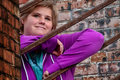
I have seen the most incredibly beautiful portraits with brick backgrounds, but i cant seem to figure out what editing is done to give the bricks an HDR look. and helpful hints?
First copy your background.
Set that copy layer to multiply and adjust opacity to your liking.
Add a mask and paint back the person(because she will be too dark as well)
I also did a Topaz Spicify preset. ( But I lowered the opacity really low) so you really don't need it.
Then a levels layer to darken the background and lower the opacity to liking. Add a mask to paint back her again.
Then sharpen again.
Check out the Topaz side challenge: TA works really well at bringing out detail in brick, wood, rocks, etc. You can make it as subtle or as cartoonish as you want.
Wildly complex job of work though. If anyone's interested I'll post details later. Masking, knockouts, opacity, curves, 2 kinds of topaz, a witch's brew.
Wildly complex job of work though. If anyone's interested I'll post details later. Masking, knockouts, opacity, curves, 2 kinds of topaz, a witch's brew.
R.
she would totally lvoe this photo, so yes, instructions would be awesome. love it!