Most of the effects from film noir is centered around lighting and not necessarily how the image is converted to black and white. It would be better to study the light in those photos then to try and fake it later. I am no expert in this by any stretch but what I generally see are images where the action or focus of the image is also one of the brightest spots in the image. Also there is very strong contrast, meaning very strong shadows and very strong highlights. The easiest way to get this effect is to just play with some cheap work lights. Another technique is to look for lighting situations where the light is bright in only one part of the scene and meter for that light and let rest of the scene go dark. This can be done through spot metering that light or through using manual mode and just playing with the settings. Another easy way I found was just to point the camera at the sky and then lock the exposure then walk around and shoot around the shadows of wherever I am, those areas will fall to darkness and you can get very moody images where the light is.
Here is a thread I started, Brightest Spot and Reflected Light images, and if you look at the link to the FlickRiver thread for The Brightest spot you will see some excellent examples of this technique. Also some very good examples from DPC people. :)
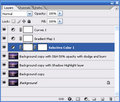
Some editing techniques to look for would be to create strong contrast. This can be done thought levels or curves. If you are comfortable using masks, with levels you can slide the shadows slider to the right to give the image deeper shadows, you can then mask out those shadows on your models, in essence making them brightest point in the image. use soft edged brushes, so that you don't have sharp drop offs in the adjustments. Here is my black and white conversion set up, To switch to monochrome I use a gradient map which adds more contrast immediately.
Good Luck!
EdiT: Looks like you realized the shooting part while I was writing. :P
Message edited by author 2009-05-04 05:06:44. |




