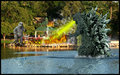
I need some help with editing, especially with the photo of the view of the lake and kazeebo. I really want to know how to make water look flowy, and soft...anyone with suggestions, or tips? Also, I wanted to know what everyone thinks of the other photos and how I edited them.
I gave it a shot, but I don't think my effort looks very natural. I duplicated the layer and ran Topaz adjust on the lower layer, using it to reduce the detail of the water.
Yo_Spiff's edit looks good to me, but I think it's tough to get the effect you're after in post processing. You might want to think about a neutral density filter and a sturdy tripod so you can shoot with a longer shutter speed and try to get the flowy-ness in camera. That might smooth out the ripples in the water.
I'm the last person you should ask, but I've been playing with topaz adjust. You can get a free 30 day trial. Works with full photoshop and elements. they have a portrait smooth and simplify options.
I overdid both on a very quick and bad select -- (sorry, would have spent more time, but I have to run.)
anyway, it looks bad, but gives you a little bit of an idea and maybe something fun to try.
I had a quick go at this but I think the smooth water look you are after is probably best done with a long exposure. Using a neutral density filter, you can get long exposures in sunlight quite easily.
Here is my effort - I only worked on the small version for about 10 mins; I should've downloaded the larger one:
I used a soft brush on most of the water, avoiding the rippled section by the fountain, I then ran a less pronounced brush over that too. I then used a darken brush over the calm water. I then selected all of the water but not the fountain and ran it through Neat Image Twice. I then tweaked the curves and black point. I then tried to compensate for exposure, colour balance and the green saturation.
Working on the high resolution RAW would have been easier.
Having said all that - I prefer yours, it's more authentic and looks just fine!
I did a search on youtube. No little mermaid vs Godzilla, unfortunately, but I did find the classic Bambi meets Godzilla. Posted for the benefit of anyone who may have somehow missed it.
First I chopped out the black border to make it easier for myself.
I used a mask to select the back smoother area of the water and applied a slight motion blur to it.
I used a mask to select the front rougher area of water and applied a even slighter motion blur to that.
I kept that area selected and using Selective Color, I made the blacks more grey. The intent there was to draw less attention to the rough ripples.
Using the burn tool on the shadows, I burned the base of the fountain to make it stand out a bit more, and also burned the shore line.
Oh, and I cloned out an unrecognizable duck.
Edit to add... The reason I broke the motion blur into two sections is that when you look at a scene in real life the foreground generally has more detail because, well, you can see it better. If you select the whole thing at once and apply the same effect to it, it becomes flat and looks fake.