I am in work and for some reason the computer card reader isn't acknowledging cards inserted. I thought it was the card so I bought a new one. In work, the computer doesn't acknowledge it at all, at home, one time my computer card reader read it, then when I put it back in it didn't. I'm confused as to what is happening - any ideas? Could the camera be damaging the cards? Or one of the card readers? Any help greatly appreciated as I took the photos for a work related thing!!!
One is a one year old computer and the other is older. The cards are compact flash cards - when I started having trouble with one I bought a new one and that one is doing the same thing. Very strange. It's like both computer card readers were reading the cards fine and now they are not - I can't imagine what the problem is. it is both cards and both computers.
This might sound stupid, but are the card reader drivers installed on the PCs? Perhaps they have been corrupted, you could try reinstalling the drivers.
You only need special drivers for external storage devices if using Windows 9x/Me. Win2k and newer will support it on their own.
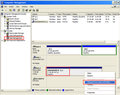
It is possible that the card is trying to use a drive letter that is already taken by something else. If you go into disk management you can determine if the flashcard is visible on the system level. If you can see it, you need to change the drive letter to something unused. Here is a screenshot and some further details:
I've had similar issues at times. Some flashdrives and cards seem to have difficulty on certain computers. Are you hearing the "doink" noise when connecting it, that indicates Windows at least detected a USB device was connected?
sometimes it makes a noise like its going to work, even the little light comes on, others it's as if there's nothing in the reader - I just don't get it!
Yes, I had this problem before. I actually ended up getting a new card that worked fine but...
1. You could try checking if your card is set to 'lock' On the side of some SD or CF cards there is a little wedge, if you move it to the other side it may, 'unlock' your card.
2. If your sure the lock is not on, it could be that when you put the card in, the lock gets pushed backwards. Try wedging some paper in there to keep the lock in place.
3. if your card does not have a 'lock' wedge, then try different ports on your computer. The drivers for your device could be installed on only one of the ports. Possible?
4. Try unlocking the card through your computer. If you plug it in, even if the card doesn't show up in my computer, your computer may recognize the device. If a little balloon pops up on your desktop when you plug it in, click that and then navigate form there to the cards digital menu. From the drop-down list, select 'enable the use of this device'.
there doesn't seem to be a lock on these cf cards.
I tried restarting computer, putting card in reader, and nothing. I opened photoshop elements, click file open, computer and there it was. I opened the driver and luckily the photos came up which I quickly saved to an ext. flash. Hoping problem solved, I put my other card in and same problem, can't find it anywhere, put the first card in, the one I just copied the photos from, and now I can't get that to show anywhere, even if I go under file open in photoshop elements.
Have no idea what is going on here - very strange. I'm glad I got these photos but need to straighten this out as part of my job is taking real estate photos and I need to be able to use my camera/computer to do i
I have gotten around a card reader problem more than once by using a usb or firewire cord, and uploading the files directly from the camera to computer. If you can view them on the camera's LCD with the card in the camera, they are there, and the card works. Try that if you are in a time jam, and if that works, then you can work on the reader problem after you get the urgent images taken care of.
When you get all the images uploaded from the cards, try formatting them with the camera before you shoot again. Maybe that will solve the problem. You may want to try that with the one that you have already uploaded to the computer.