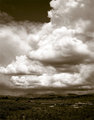
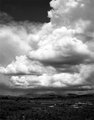
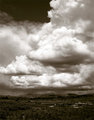
I'd tone it, but not that heavily... maybe use an adjustment layer on the color blending mode? Just a thought... maybe push the blacks too in selective color.
I'd tone it, but not that heavily... maybe use an adjustment layer on the color blending mode? Just a thought... maybe push the blacks too in selective color.
total cost $0.02.
I think I am leaning towards the toned image, but agree with you and others that having it be a little more subtle might be better.
What did you mean by push the blacks too in selective color?
There's a thing called 'selective color' that opens up a little submenu of the main color groups, as well as whites, neutrals or blacks. I find that selecting neutrals and maybe adding 3-5% in the blacks helps give some depth and shape to objects where you want to emphasise the roundness.
There's a thing called 'selective color' that opens up a little submenu of the main color groups, as well as whites, neutrals or blacks. I find that selecting neutrals and maybe adding 3-5% in the blacks helps give some depth and shape to objects where you want to emphasise the roundness.
Thank you. I like that technique. I had not used the selective color all that much.
I have finalized on a print. There is slightly more contrast in the clouds and the tone is more subtle than the original that I posted. Thanks for all of your input.