I use LR, DPP & Fastone but none of these seem to have an easy crop to 16:9 (they can all do it with a lot more steps).
I am looking for something where I can define a 16:9 ratio and stamp a stack of photos by moving a box around each image and have it create the 16:9 image based on where I put the rectangle. I have a stack to do, so was hoping to make this as simple as possible... suggestions??
I can easily do that in Paintshop Pro. I create a crop of the appropriate size and then save it as a preset. the crop tool will default to the last setting used, which makes it easy to apply to multiple images.
I am not familiar with those applications you are using, though.
Forgot about Picasa... Thx; Let me have a play there.
So I tell my parents when getting their digi photo frame to MAKE SURE IT'S 4:3 (to match their P&S) but noooooo.... they like the widescreen thingi with the dickie aspect like my stupid TV that never fits anything :-/ Sorry about that rant.... back to your schedule programme now....
If you enter a 16x9 crop once in lightroom as a custoom crop dimension it will save it at the bottom of the list to use in the future...
ETA: too late.
Yeah, I know how to do it in LR, the prob is that I don't want to change the crop or no-crop of the existing images and I certainly don't want to create that many virtual copies. I just want to run thru the processed images and slice the top off where I want rather then letting the digi frame do it.
Picasa is no good because you cannot define anything then the std ratios.
FastStone does it (well, it slices the same amount off the top and bottom)
- Go into Tools / Batch Convert Rename
- Select all the images you want to crop
- Make sure you've ticked 'Use Advanced Options'
- Click the 'Advanced Options' button, go into the Crop tab, set your ratio
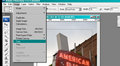
Select the marquee tool.
look at the top tool bar.
Change the style from "normal" to "fixed ratio" set width to 16 and height to 9.
Drag your marquee where you want it. It will keep the ratio entered.
When you are happy go to the "image" drop down menu. Select "crop"
Sorry, I was so happy to know the answer I didn't notice you don't mention photoshop.
NEVERMIND
FastStone also gives you this technique (if you want to set the crop position)
- Open up the first image fullsize
- Hit 'X' to bring up the crop board
- You won't see 16:9 in the ratios, but you can add it by clicking the small button with the three dots
- Move the crop rectangle whereever you want it
- Click 'Lossless crop to file', and give it a new file name
- Then click the 'next' arrow to move to the next image
You should get through them fairly quickly that way.