I know there's lots of techniques for converting an image to black and white, but have many of you tried the opposite? I found an image I took a while back that didn't have its color partner...so I thought I'd try and colorize it. I played around with lots of different blended layers, dodge and burn layers, and some lens flare to blow out the sun a little more. Let me know what you think, and I'd love to see some other examples!!!
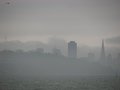
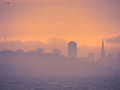
I think your image works great too. I often "colorize" images which have little or no color to start with, almost always using Curves to accomplish it; the picture of the Golden Gate was done in Duotone mode (it's a tritone using Black, Cyan, and Yellow).
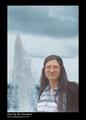
This portrait of my friend Kate, which started as an actual B&W print, is probably my best; unfortunately, I did it about 12 years ago and can't remember all the steps, though I'm sure I was up near 20 layers (more than colorizing going on here) by the time I finished.
Original: Final:
Here are a variety of others, with varying degrees of modification; they are all color originals shot under "gray conditions":
The original is the size seen and was only about 40kb.
Much of this one had to be turned into a B&W, then hand-toned.
(Yellow sodium lights are murder! No white balance can correct it before or after the click)
From RAW conversion: After desat & hand toning: