so would creating a copy of the background layer, apply gaussian blur and then decreasing the opacity of the layer until the effect is achieved... legal or not? (I usually just avoid basic editing challenges, that way I don't have to think :P)
so would creating a copy of the background layer, apply gaussian blur and then decreasing the opacity of the layer until the effect is achieved... legal or not? (I usually just avoid basic editing challenges, that way I don't have to think :P)
Layers with image data are not legal, only adjustment layers, in basic editing (not sure I worded that right).
Lots of ways, but ironically not by having the lens be out of focus.
There are "soft focus" lenses, which do a nice job, but may not be for everyone.
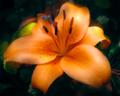
The other way is to place some sort of diffusion material over the front of the lens. Things that are worth experimenting with: pantyhose or other fine mesh material, cellophane (for this image , I used the wrap from a CD, mildly crinkled), or take a UV filter and smear vaseline on it (One of the few useful thing a UV filter is good for).
If you search around for it, Scalvert posted a very eay soft focus method using gaussian blur over a grossly oversharpened image the last time the challenge popped. I think it was Scalvert, maybe Kirbic. Anyway, works quite well.
If you search around for it, Scalvert posted a very eay soft focus method using gaussian blur over a grossly oversharpened image the last time the challenge popped. I think it was Scalvert, maybe Kirbic. Anyway, works quite well.
Yes. For Basic Editing (steps assume Photoshop as the editor):
- Apply Gaussian blur, approx. 3-6px radius (maybe a bit more for very large images)
- Immediately after applying the blur, select Edit>Fade Gaussian Blur and adjust opacity down to 25-40% as desired. Don't change the blend mode since that's not legal in Basic.
The above works best if you start with an image that is carefully sharpened to the point of being a little sharpen than you'd normally go, and with contrast adjusted a little higher than you want in the final image. Experiment!
Seems to me that's no different than using a copied layer and fading it, the way kellian asked, but thems the rules. ;>P
Originally posted by glad2badad:
Originally posted by kellian:
so would creating a copy of the background layer, apply gaussian blur and then decreasing the opacity of the layer until the effect is achieved... legal or not? (I usually just avoid basic editing challenges, that way I don't have to think :P)
Layers with image data are not legal, only adjustment layers, in basic editing (not sure I worded that right).