I want to look up "Subject out of Frame" and *NOTHING* comes up thru the photo search, and I have *NO* idea how to search old challenges.
Since this challenge is "II", why won't the search term "Subject out of Frame" produce anything at all in photo search?
I've been here for over 15 years and have truly never been able to find much of anything.
It's kind of funny in a way because I'm really, REALLY good at hunting things down on the 'Net that are difficult, but this site has always been impossible for me to find much of anything.
I want to look at the last "Out of Frame" challenge.
I've always wished I could find old challenges easily, too, so thanks for bringing this up, Jeb. Thanks for responding, Barry. But there seems to be some step missing. How do I bring up a typeable space? The Ctrl F brings up a box of options, but none of them seem to help.
I've always wished I could find old challenges easily, too, so thanks for bringing this up, Jeb. Thanks for responding, Barry. But there seems to be some step missing. How do I bring up a typeable space? The Ctrl F brings up a box of options, but none of them seem to help.
There is a step missing. After checking the box to show all, you have to click the "filter" button, to actually have it show all. Then the control F should just pull up your normal search box.
I've always wished I could find old challenges easily, too, so thanks for bringing this up, Jeb. Thanks for responding, Barry. But there seems to be some step missing. How do I bring up a typeable space? The Ctrl F brings up a box of options, but none of them seem to help.
There is a step missing. After checking the box to show all, you have to click the "filter" button, to actually have it show all. Then the control F should just pull up your normal search box.
Thanks, but no, it doesn't make any difference. There's still no place to search.
Thanks, but no, it doesn't make any difference. There's still no place to search.
There should just be a small text box showing - the same you'd get when doing Ctrl-F on any web page. What browser are you using?
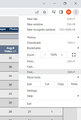
I found it! In the box of options I selected find and then a little box did come up and when I typed in Subject out of Frame it highlighted the appropriate challenge. Thankyou, thankyou, much appreciated.
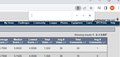
Cool. Not sure if there's something else in your settings that needs to be flipped on/off, but this is what Ctrl-F gets you with Chrome. It shows up in the top right of the browser.
Cool. Not sure if there's something else in your settings that needs to be flipped on/off, but this is what Ctrl-F gets you with Chrome. It shows up in the top right of the browser.
Cool. Not sure if there's something else in your settings that needs to be flipped on/off, but this is what Ctrl-F gets you with Chrome. It shows up in the top right of the browser.
That didn't show up for me. I wonder why?
Not sure. But if you look at the place where you found 'Find' you'll see that the key combo to get the same thing is Ctrl-F. :-)
Hopefully somebody else may have additional insight. I need to turn in for the evening. TTYL
Cool. Not sure if there's something else in your settings that needs to be flipped on/off, but this is what Ctrl-F gets you with Chrome. It shows up in the top right of the browser.
That didn't show up for me. I wonder why?
Not sure. But if you look at the place where you found 'Find' you'll see that the key combo to get the same thing is Ctrl-F. :-)
Hopefully somebody else may have additional insight. I need to turn in for the evening. TTYL