I found a bunch of old photos I was going to send away to have scanned and possibly to edit. For the cost of that I could probably buy a nice little scanner and do it myself. The photos I really like I can scan hi-res and PS them.
I'd love some suggestions on a scanner that I don't have to sell my child for. Only kidding, no one would buy them.
Easier to just photograph the photos. Recently did this to create a family photo book. If you can set a tripod up over the photo area and then move a new one in each time it's really quick.
Easier to just photograph the photos. Recently did this to create a family photo book. If you can set a tripod up over the photo area and then move a new one in each time it's really quick.
Even if I wanted to use a few for editing?
Thrust me, out if 500 there will only be nax 10 I like enough to do that.
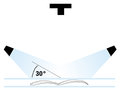
If you're going to re-photograph old prints you might want to get or set up the equivalent to a "copy stand" (see diagram) so that you get even non-glare lighting and a consistent focus and exposure.
ETA: My public library has copier/scanner units available for free (or nominal cost) -- you can scan to a USB stick or email the file to yourself. If you only have a few prints to scan (and your library is "with it") that might be a viable option.
BTW, when I say old I'm talking only 15 to 20 years ago.
I do have several hundred prints to copy. So library is out and the lighting technique is good, but time I get that set up perfectly I'd be done with a scanner.
If I were to buy a scanner what would you recommend or where to buy a cheap copy stand.
Nevermind, I'll use this new thing called YouTube and make one.
You should all check this YouTube out.
Home Depot here I come.
If anyone knows of a good site and or video on how to make a cheap photo copy stand please let me know.
It's been a long time since I bought one ... like cameras I expect modern versions will have all caught up to the quality of a few years ago.
The only "critical" factor is the "native resolution" -- how many actual physical pixel there are in each row -- so beware of claims like "effective resolution" where they incorporate automatic upsampling (like "digital zoom" on a camera). I think in the "old days" the minimum we'd consider was something like 1440 ppi (pixels per inch), which would let you reprint a 4x6 at about 28 inches on the long side. 2000 or 2400 ppi would obviously be better if you want bigger files. Most scanners will probably come with both stand-alone software and a Photoshop plug-in. Make sure it can save in TIFF or Photoshop or other lossless file format. Oh, and if it can acquire in 16-bit mode you will have the option of having more color shades available.
What type of computer/operating system are you using? Connectivity could always be an issue.
I'd suggest looking for reviews at a "reputable" tech site such as Cnet.com ...
If you're going to re-photograph old prints you might want to get or set up the equivalent to a "copy stand" (see diagram) so that you get even non-glare lighting and a consistent focus and exposure.
ETA: My public library has copier/scanner units available for free (or nominal cost) -- you can scan to a USB stick or email the file to yourself. If you only have a few prints to scan (and your library is "with it") that might be a viable option.
Looks interesting. Do you know an "easy" way to do this. While I'm waiting for your reply I'll look at youtube and instructables.
I've been going through a ton of old photos that my parents and grandparents took over the years. Some of them date back to the early 1900's. I've had good luck just taking pictures of them with my iPhone 7+ and processing them on the phone with the apps Photoshop Express and Snapseed. Photoshop Express lets you send your pictures to Lightroom and Creative Cloud. Snapseed is very easy to work with, and I don't think either app costs more than $5.00. As far as I know, neither app works for color slides or color or black and white negatives. There are a lot of really good apps out there for editing on an iPhone. I don't know anything about other camera phones.
I take my photos out to the patio and work in open shade so I don't have to deal with glare or shadows.
I have a home scanner and I started by scanning them and then ditched it ... it takes ages to scan. Shooting them with a camera is much quicker.
Also, many were stuck in those old album with a tacky surface so I couldn't take them out or they would be ruined. It was easy and quick and I did a couple of hundred.
Upload then crop then edit to your hearts desire as you have a large file to work with.
It worked better for me this way but your process of scanning might be different to what I had.
I just starting going through the photos. Most of them aren't even worth scanning. So, I'll go the route of taking pictures of the photos.
Now, I have to figure out the best way to take the pictures. Maybe upside down in a tripod?
The most important factor is having the photo and the plane of the camera sensor absolutely parallel to avoid distortion. A copy stand positions the camera pointing straight down at the table/platform where the photo sits; you can probably position a tripod to achieve this effect (maybe zooming-in on a photo on the floor). You can use a couple of swing-arm or goose-neck desk lamps to set up the lights as in my diagram.
I looked into a copy stand. They're expensive. So I'll do a makeshift one. Lighting isn't a problem. It's getting the photo flat and at the right angle. Maybe putting them under a piece of glass?
Using a cover glass is fine, but it makes setting up the lighting properly more important to avoid glare/reflections. Drawing some guidelines on the shooting surface to get the pictures really straight will probably help too.
The main trick is to get the camera pointing straight down. If your tripod has a way to do that, go for it. You probably want a set-up where the photo doesn't quite fill the frame on your camera since most lenses are sharpest toward the middle.
Also, since you've decided (a few posts back) to cull the photos maybe reconsider using a scanner at the library -- you can usually scan 2-4 prints at a time and separate them in your editing program later.