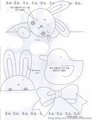
I need help with something that's taking me away from DPC. :)
I bought a cricut maker machine and am having a blast with it. But I have what I think should be a simple question that you guys can probably answer quickly. (wow -- that was a poorly worded sentence...)
I need to turn this into a simple line drawing so I can use the machine to cut out the patterns. I can get rid of the grey by selecting a portion and then selecting similar and deleting it. But either it selects part of the actual bunny lines, or more likely the bunny lines are not solid to begin with. How do I quickly go and get those outlines solid so I can turn it into a good vector drawing? I'm lousy at simply tracing it, and I have lots more bunnies to fix.
I'm trying to make a baby quilt for a co-worker in less than a week, so I really need to get this figured out fast. The hard part is supposed to be the quilting, not the pattern. :)
Try using Curves or Levels to make the dark parts darker and the lighter parts white, then change the mode to Bitmap (black and white only) ... you might have to touch-up by drawing/erasing where needed.
THat's what I did. THen made line art in AI.
Wendy, LMK if a PDF works or if you need something else.
Originally posted by GeneralE:
Try using Curves or Levels to make the dark parts darker and the lighter parts white, then change the mode to Bitmap (black and white only) ... you might have to touch-up by drawing/erasing where needed.
I don't have illustrator. I used to have aldus freehand, and could have done it so easily in that!
Does changing the mode to bitmap fill in the blank spaces if there's breaks in the lines? I had played with the contrast in another test, but it still left the breaks.
Thanks, Tate! I'll put a few more up, but I would like to learn the techniques to do it quickly, because I think I'll be doing it quite a bit.
AS far as I know,
PNG is raster while
SVG is vector.
which do you want?
Originally posted by vawendy:
I'm trying to get the output into SVG and PNG. I've been using some online converters to do this, but they seem to be inconsistent on the output.
Both, actually. They have different plusses and minuses when bringing them into the design space. An SVG will allow me to split it into pieces easily. The PNG works better for working with it as a whole.
oops! Wait -- bringing it into the program -- you're right. I can try that now. Going off to give it a shot. (I'm in a hotel, so I don't have the machine, but I'll be able to tell if it works correctly. I'll need to convert it first.
Try using Curves or Levels to make the dark parts darker and the lighter parts white, then change the mode to Bitmap (black and white only) ... you might have to touch-up by drawing/erasing where needed.
I'm trying this in photoshop, but when I go to mode, bitmap is greyed out. I tried flattening the image, but that didn't help. How do I change it to a bitmap?
Try using Curves or Levels to make the dark parts darker and the lighter parts white, then change the mode to Bitmap (black and white only) ... you might have to touch-up by drawing/erasing where needed.
I'm trying this in photoshop, but when I go to mode, bitmap is greyed out. I tried flattening the image, but that didn't help. How do I change it to a bitmap?
You probably have to first convert to Grayscale, then to Bitmap ...