Finally, after all these years. I have a state-of-the-art smartphone and OMG! I can't describe how thrilling it is. On the communication front, it's a marvel; I can text and connect with amazing ease, something I could never do with my little LG phone, and it works SO well as a Kindle reader and a Facebook browser I can't even believe it.
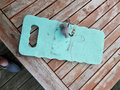
But the CAMERA! Wowser! The quality is amazing. I just shot this out on the deck table in late evening overcast light, at f/1.7 and IS0 80, and the ability to zoom in is spectacular. Click the link to see the full-size image... This is totally unedited, in-camera and out-of-camera, just a straight JPG.
Have fun, Robt! Most of my shooting these days is with my S6. And the camera is starting to develop a wobble (the lens wobbles when I first fire it up but will eventually reset) so when that goes, even if I haven't finished paying for the phone, I'll be getting a new one!
And just think - for at least a little while, you can OWN that camera's page. Shoot away!!
Most of my entries are with S7 which has the same camera module. They are good. I'm tempted to upgrade to S8, not the + cause I do go outdoors quite a lot and it's a bit too large to carry, but with all its gorgeous design and screen doesn't justify the upgrade from S7.
It's a great tool Enjoy.
Download the snapseed. It's a portable nik.it even processes raw.
Ha!
Welcome to the Galaxy! I finally bit the bullet in March of '16 when the S7 came out, and I have not looked back. Great devices (can't with a clear conscience say 'phones, they are so much more).
AND you can set it to 1 second exposures. Mine will go up to 10 seconds, I think. Not great, but fun to play with! There's a PRO mode - find that and see what you can do with it.
I haven't quite figured out how to use it as a manually-set camera yet. I *thought* I'd found how to set it to save RAW files, but I'm not seeing them when I transfer the DCIM to my computer... Anyone have any useful tips?
I haven't quite figured out how to use it as a manually-set camera yet. I *thought* I'd found how to set it to save RAW files, but I'm not seeing them when I transfer the DCIM to my computer... Anyone have any useful tips?
There's some decent apps but most are for processing. There is an app called "manual camera" that is pretty good. Lots of manual mode features.
I haven't quite figured out how to use it as a manually-set camera yet. I *thought* I'd found how to set it to save RAW files, but I'm not seeing them when I transfer the DCIM to my computer... Anyone have any useful tips?
One thing to note on RAW files... even if you have the camera set to write to a micro-SD card, it refuses to write RAW files out there; at least this is the case with the S7. Dunno of that would affect you. Used to be there was another bit of confounding behavior. Every time the camera app was closed and re-opened, the switch to record RAW would be turned off. That was fixed with Nougat, which I'm sure you have. Thecamera still reverts to Auto mode every time though, which is less irritating... but still irritating, IMO.