For analyzing colors I'd just zoom in real close and use Photoshop's "Info" window -- is shows the exact color values for whatever pixel (or small area, depending on settings) the cursor is over, any any two color spaces you want. However, that doesn't help completely if the photo has a color-cast/color shift with no reference ... in that case hope there is something white or of a "known color" (e.g. Coca Cola can) which can be used.
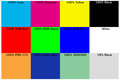
For pictures he's you're taking now, I'd suggest continuing to use a reference card, perhaps similar to the one linked below, to help "standardize" the pictures before analysis. I don't know what else to call it but a color-reference card ... since these are more-or-less "forensic" photos you might also include a measurement reference (ruler) in the photo to allow analysis of scale (thread count, pattern size).
I use this to create custom White-Balance settings to simulate using a color filter, but it should also work in the "other direction" to correct a color shift. You'd want to use the top 8 swatches ...
Message edited by author 2016-09-13 19:09:28. |




