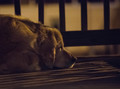
If anyone would like to get comments GOOD OR BAD after a challenge has ended.. This thread is not for the faint hearted but for those that REALLY TRULY full heart earnestly want to learn from their photos or why a photo scored the way they want too.
This is what this site is about about seeing what others see. What makes a photo tick.
I really thank those that have already left comments on images already ;0))
I feel this is the only way around commenting for now for those of us that do not wish to make comments during challenges.. until the changes have been made for our little box "during" voting have been made available.
So, Feel free to add your shots you would like feedback here with.. kinda like a CC groupie thread kinda of thing.. I will be adding comments to those that post as well.
Yes, I realize there is an individual photo discussion section, but I truly feel it is separated from the current challenge photos. I feel that section it is a drop one drop all kind of section for any and all photos and not really geared to the challenges.
Hence, this thread :-)) For current/ past challenges only :-))
~~~~~~~~~~~~~~~~~~~~~~~~~~~
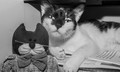
One shot that I was really wondering about and I really loved this shot, it was in the last few challenges here a few ago,
Should I have done black and white? Did I have the settings wrong, cropping?
In my opinion this photo couldn't be improved by any form of editing. It is a photo that is made for the pet owner and the pet owner alone, it has no interest whatsoever for someone not familiar with the pet. A photo is not about processing, it's about content and feeling, if you get the latter right then processing, lighting and other technical stuff will uplift it further. I'm sure Speckles is wonderful cat and a good friend and that should be cherished and captured for you and yours. My wonderful dog Gap is licking his balls right in front of me now, I wouldn't however want or think that an image of him doing that would be of interest to anyone. Hope I haven't been to harsh.
Not harsh at all John, tell it like it is and that is what I love to hear, I am used to really hard CC so its all good to me, especially when it comes to coloring, contrasting etc because its hard for me to see the shades and differences, I really want to know how things are being seen to help me focus to those kind of details for when I shoot next. Makes sense, honestly, thank you!
However, the family wishes to do this thread is fine with me :-)) Both suggestions are good :)
One shot that I was really wondering about and I really loved this shot, it was in the last few challenges here a few ago,
Should I have done black and white? Did I have the settings wrong, cropping?
What Jon said and had this been mine, I prolly would have composed/cropped this to ensure that I got the paw and ear that managed to get lopped off.
Not all pet shots get panned.......but they are at a disadvantage here......
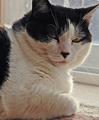
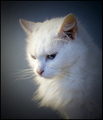
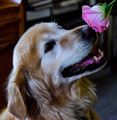
The first one, obviously, a pet portrait challenge, the second, love for JulietNN after she lost her dog, and the third, Sleeping Pets. So there is a time and a place for pet shots, just generally not in regular challenges.
Hi Julie,
The image has a couple of things going for it, the cat is looking at you and the eyes are sharp,
It is the crop that lets image down a bit, the ear of the cat should be in the image, could crop off more of the paw
so it isnt there at all, a little off the sides and a slight vignette to make the eyes more of the focus.
That makes more sense about the cropping and thank you all for the feedback
The cropping has always has me hindered back from advancing to better things I feel because I am not sure of any guidelines to follow or what makes a good crop vs a bad one.
What makes a good close crop vs a further away one. Its like there is a block of learning to do yet on it :-)
What I do love is that what you all see go in line to how things were voted upon which now is very clear and makes more sense.
This is the kind of feedback I love to get
I have also noticed on my wildlife photos that when I go to crop in, it seems to loose detail and gets more noise on the image as well, not sure why that is, but I thought cropping up would not matter but it seems it does and it also seems to loose the sharpness.
I would add imho that you should try to frame it as if there was no such thing as a crop tool. This will train your eye better and encourage you to work a scene and try a few different compositions as well as give you better resolution. Naturally the crop tool is good for fine tuning or removing edge distractions but it is a bad habit to start relying on this instead of getting it right 'in camera'
I would add imho that you should try to frame it as if there was no such thing as a crop tool. This will train your eye better and encourage you to work a scene and try a few different compositions as well as give you better resolution. Naturally the crop tool is good for fine tuning or removing edge distractions but it is a bad habit to start relying on this instead of getting it right 'in camera'
I would add imho that you should try to frame it as if there was no such thing as a crop tool. This will train your eye better and encourage you to work a scene and try a few different compositions as well as give you better resolution. Naturally the crop tool is good for fine tuning or removing edge distractions but it is a bad habit to start relying on this instead of getting it right 'in camera'
That is exactly how I have been shooting so I have it backwards.. so I really, as it is looking, I should be starting over and learn composition first. Always trusted the crop tool to get where I needed to be
Thanks Rachel
Never shot from a film camera so I would have no clue how they work, closest I ever came was those disposables, but didn't use a lot of those because I had a lot of wasted shots LOL
I have also noticed on my wildlife photos that when I go to crop in, it seems to loose detail and gets more noise on the image as well, not sure why that is, but I thought cropping up would not matter but it seems it does and it also seems to loose the sharpness.
You may be cropping and resizing/resampling at the same time -- try to post a screen-shot of your crop tool settings and a maybe a before/after sample. It's hard to diagnose a problem with a photo without seeing it ...
I would add imho that you should try to frame it as if there was no such thing as a crop tool. This will train your eye better and encourage you to work a scene and try a few different compositions as well as give you better resolution. Naturally the crop tool is good for fine tuning or removing edge distractions but it is a bad habit to start relying on this instead of getting it right 'in camera'
I'm not sure that the "fill the frame" approach is always the best approach. When I did a lot of my own 35mm darkroom work, I learned to leave a little space for cropping. Not all pictures look their best in a 4x6 aspect ratio. When you fill the frame, with the current digital cameras (4x6 aspect ratio), you might end up with cropped ears or paws if you want to go with a 5x7, 8x10, or 11x14 aspect ratio.
I have also noticed on my wildlife photos that when I go to crop in, it seems to loose detail and gets more noise on the image as well, not sure why that is, but I thought cropping up would not matter but it seems it does and it also seems to loose the sharpness.
You may be cropping and resizing/resampling at the same time -- try to post a screen-shot of your crop tool settings and a maybe a before/after sample. It's hard to diagnose a problem with a photo without seeing it ...
I use light room, so I will have to figure out how to get the screen shots information that you need when I crop