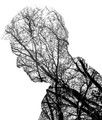
Absolutely nothing wrong with this wonderful image, but I'm just wondering why this didn't got a DQ.
Rules say:
You may not:
- combine captures of different scenes, move or change a feature between frames, or combine different captures to create a new scene.
- use ANY editing tool to move, remove or duplicate any element of your photograph that would change a typical viewer's description of the photograph (aside from color or crop), even if the tool is otherwise legal, and regardless of whether you intended the change when the photograph was taken.
- use ANY editing technique to create new image area, objects or features (such as lens flare or motion) that didn't already exist in your original capture(s).
Now it's not my intention to get a DQ for this particular image, but I'm just wondering which part I'm missing here. Eg. I see captures of different scenes..
Voting on validation requests is not always completed by the time the results are posted, which is why we have the occasional re-calculation.
And we voters are always complaining in the last minute ;) Take your time, but whatever the result will be, an explanation about the final result would be appreciated.
Regardless of if this gets DQ'd or not, it's rare that you see something like this any more on DPC. Years ago there use to be any number of people showing their multiple exposure images, images that were way out of the box and other non-conformist type photography. Yes, there are still some very good to excellent photography on here, but it's either the same ole thing or almost completely fabricated in Photoshop to the point that it almost isn't a photo any more. It's a shame, but I guess to be expected since most of the people that did think outside of the DPC box have already left and those still here shy away from it since it doesn't fit in any more.
I think it would be possible to get this photo legally, but the comments actually say it is 3 captures.
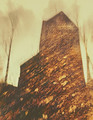
Yes, that will be the killer. However, it is possible to do something sorta similar in Advanced, without in-camera multiple exposure - although this particular example is pretty messy:
A quorum was reached and the image has been disqualified. It was the photographer's intention that the trees would be a texture applied to the inverted photograph of the man, but SC finds the trees are effectively the *subject* of the image and are working at a much higher level than "texture". There IS a gray area that's been introduced when we began allowing textures under advanced editing, but this particular image is way, way on the double-exposure end of the spectrum.
. . . It was the photographer's intention that the trees would be a texture applied to the inverted photograph of the man, but SC finds the trees are effectively the *subject* of the image and are working at a much higher level than "texture". . . .
Plus don't textures have to be applied uniformly over the entire image in Advanced? It looks to me as if the "texture" was effectively erased - by whatever method - from the background and applied selectively.
@skewsme Any link available how you can do such a thing (without just editing)?
@Bear_Music Thanks for the explanation!
The technique is simple: lock the shutter open on Bulb while the lens is covered, point the camera, uncover/recover lens, point camera at next "subject", uncover/recover lens and so forth. There's a lot of by-guess-and-by-gosh involved, but the results can be wonderful. The same can be done in studio much more precisely with tripod and strobes...
@skewsme Any link available how you can do such a thing (without just editing)?
@Bear_Music Thanks for the explanation!
The technique is simple: lock the shutter open on Bulb while the lens is covered, point the camera, uncover/recover lens, point camera at next "subject", uncover/recover lens and so forth. There's a lot of by-guess-and-by-gosh involved, but the results can be wonderful. The same can be done in studio much more precisely with tripod and strobes...
If you use flashes to dictate the light levels, you can make things pretty controlled, as well, with some results that hardly even look like the typical digital fare. If you've got questions, you're welcome to PM me.
ETA: Was posting when the Gyaban image was posted. It is most definitely one of if not the best example I've seen on DPC.
@skewsme Any link available how you can do such a thing (without just editing)?
@Bear_Music Thanks for the explanation!
The technique is simple: lock the shutter open on Bulb while the lens is covered, point the camera, uncover/recover lens, point camera at next "subject", uncover/recover lens and so forth. There's a lot of by-guess-and-by-gosh involved, but the results can be wonderful. The same can be done in studio much more precisely with tripod and strobes...
I think this particular photo could be done using a mask cut out in the shape of the profile and holding it in front of the lens during most of a long exposure, the whisking it away to capture the trees in the masked area and covering the lens/ending the exposure.
Thanks all for the reactions and refreshing my memory. gyaban's comment is a very helpful tutorial and, looking back at all my challenge entries, I tried it myself a long time ago. Completely forgot it :(
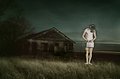
I thought this one was similar in nature to the OP's question. How is this not two images? It's an interesting effect but seemed to push the limits a bit IMO.
I thought this one was similar in nature to the OP's question. How is this not two images? It's an interesting effect but seemed to push the limits a bit IMO.