I found an online tutorial for creating snow in Elements or PS. I worked through it quite easily but now I want fewer "flakes". I have tried re-doing, changing settings at various points, but have not figured out where exactly I should be modifying the instructions. I have the instructions in document form and would be happy to send them to someone. If you are good at this sort of thing, I think it would just take a minute to read through and tell me where to be experimenting. TIA for offers of help.
if it's not for a challenge, download a snow brush. but because that's a no-no for some stupid reason here. you need to do what i did and make your own.
once i created the brush, i painted in snow at different sizes and opacities to achieve a realistic look. snow in the back is smaller and closer together, snow closer to the lens is larger, spaced further apart and more opaque.
Thanks to both of you. I will pm aliqui and also look into creating my own snow brush.
If I do the latter, am I able to use it in future challenges or do you have to re-create this kind of brush every time you want to use it?
you have to be careful with custom brushes because some are created using images. so those are illegal unless you created with your own image and its within the challenge dates, sort of like using a texture.
they should be perfectly legal for any challenge since you are just modifying how photoshop places pixels, which is legal in expert.
in fact if you created this brush and gave it to me i should be able to use legally since it wasn't made with any images, its just like using a preset you downloaded. if just settings for a tool in photoshop.
hopefully someone chimes in if i'm wrong but i'd be shocked if thats the case.
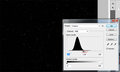
They both use a method that speckles the whole image with tiny grain. After that step the key will be the "Levels" adjustment to control the amount of "flakes" that are in the image. Squish the black and white sliders (left and right foremost under histogram image) closer to the middle and you should see the majority of the "flakes" disappear.
Here's one I was playing with showing the Levels settings:
Got it. I would never have figured this out :)
Got the brush created, too.
Lots of learning going on here :) Really appreciate the help from all of you.
Here's one I was playing with showing the Levels settings:
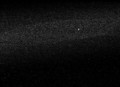
I'm not sure how you started out, but this looks similar to what I do to create a "star field" from excessive noise ...
Her tutorials had two methods that were both later converted to Screen mode layers. One used Texture --> Grain and the other used Noise --> Add Noise. Both produced very similar results, but the one in my screenshot was the Noise --> Add Noise method.
I am happy to share the tutorials. However, I have to send them as document attachments. I saved as rtf so that should be ok for most. PM me your email and I'll send them to you if you are interested. (In about 30 minutes, I am going over to stay with a sick grandbaby to help her mommy out and won't have access to my documents until tomorrow late sometime, but I'll get back to you)
Her tutorials had two methods that were both later converted to Screen mode layers. One used Texture --> Grain and the other used Noise --> Add Noise. Both produced very similar results, but the one in my screenshot was the Noise --> Add Noise method.
I just shoot at ISO 800 and there's plenty of noise ... :-)