Has anyone had trouble getting images to display correctly in both Chrome and Firefox? Any image I export from Lightroom will get saturation and black level issues in both of these browsers. I have the export set to convert to sRGB but it still doesn't look right.

Check out the black levels of the eye, and the saturation of the red jelly.
The sources of the images from left to right are...
Chrome
Internet Explorer
Firefox
Lightroom 3.5
I thought it was just a problem with my photos, but a number of other photos on DPC also have this issue.
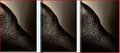
This is Mike's ribbon winner "Contrast in Harmony" (I hope you don't mine using it as an example). Check out the background gradient and how messed up it looks on both the left and right image, but the center image looks perfect.
Sources from left to right...
Chrome
Internet Explorer
Firefox
I also found that I can fix most of the color shift by doing a "save for web" in Photoshop CS5 with the profile set to sRGB and the preview set to "Internet Standard RGB". There is still some difference, but it's reduced. No matter how I save it, Internet Explorer displays it identically to Lightroom and Photoshop.
Most of the images on DPC (and else ware) don't have this problem, so what am I and a few others here doing to make our files look like crap on everything except Internet Explorer? I sure don't want the solution to be "use Internet Explorer", I hate that thing.
|




