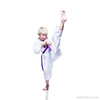
My monitor is not calibrated yet. I'm wondering if anyone can tell me how this looks on your screen? Is there good separation between the background and the uniform? Skin tone look fine?
looks really good. Perhaps a tad blueish purple but just barely. Also it is hard to tell at the size but it almost looks like there is something by his ankle, the one on the floor. But really nice work.
Go to Image Adjustments > Levels -- In this tool, you'll see a white eyedropper tool, select that and click on a bright white patch of his gi, and then press OK.
Next go to Edit > Fade Levels -- Here change the mode to Color, since your exposure is already pretty spot on, and leave it at 100% opacity, select OK, and you're done.
Go to Image Adjustments > Levels -- In this tool, you'll see a white eyedropper tool, select that and click on a bright white patch of his gi, and then press OK.
Next go to Edit > Fade Levels -- Here change the mode to Color, since your exposure is already pretty spot on, and leave it at 100% opacity, select OK, and you're done.
looks really good. Perhaps a tad blueish purple but just barely. Also it is hard to tell at the size but it almost looks like there is something by his ankle, the one on the floor. But really nice work.
I thought so too -- I zoomed in and it's actually his ankle. It's just a weird angle I guess.
This looks really good! The only nit is the highlight along the side of his face and jaw. It's just a tad too bright and looks like an odd little beard. Otherwise, it's perfect to me.
Thanks all. I really need to invest in a monitor calibrator. It's just doesn't sound like a fun investment at all -- would so rather put the $$ toward a lens or 5DII.
i think it looks fine, a common processing technique i have noticed among children is extremely sharp and cool in color. yours fits that bill, i cant say i don't prefer warmer colors but the cool look does lend itself to a crisp finish.