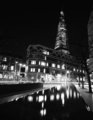
I often write in my challenge details that I use "calculations to b/w". mitalapo asked what I mean by that.
Well, it's a Photoshop trick I learned from bucket. In the image menu, find "calculations". It will open up a dialog that allows you to take two channels (red, blue, green or gray are your choices) and then blend them in various ways to create a black and white image. The most effective blending methods seem to be overlay or multiply. The blending creates a more contrasty image.
I recommend saving it as a new document, doing a select all, copying and pasting into the original as a layer. Close the new document without saving. If you do it as a "new channel" it shifts you into some strange mode that I haven't figured out.
Calculations is definitely confusing for beginners. I bet if you published a How-to it would get published. It helps to know for example, it blends from the top down, similar to the layers palette. So when you set blend mode to Normal at 100%, you are only seeing the top layer (channel). When you blend with Multiply, you are darkening with the top layer (channel).
Do you ever convert to B&W w Lab channels? I'm curious as to whether it's worth checking out.
B&W makes a picture look "better," or turns an average photo to a good or great photo -- it's nearly cheating IMO (especially on DPC).... it takes more effort/skill to shoot/process and create a high rating photo in color
That being said, there are times when black and white work - mostly portraits. This also explains why the top 5 photos for "Pets and Their People" are B&W...
Very true, laziness reigns with B&W.
Not to mention some dodgy characters that insist on not processing at all, do all with camera, not even cropping, straight from the camera, click and it's done, how lazy is that..
Fortunately they get punished most often than not vote-wise, but how annoying is that sometimes one will slip through the net and even ribbon, laziness rewarded.
HDR & Topaz rulex!
(sorry, I just read three books on B&W printing, I just couldn't help myself..)
B&W makes a picture look "better," or turns an average photo to a good or great photo -- it's nearly cheating IMO (especially on DPC).... it takes more effort/skill to shoot/process and create a high rating photo in color
That being said, there are times when black and white work - mostly portraits. This also explains why the top 5 photos for "Pets and Their People" are B&W...
Um... if to you a photo looks better in black and white than in colour, why would you insist on publishing the photo in colour? Just saying.
Do you ever convert to B&W w Lab channels? I'm curious as to whether it's worth checking out.
I find it nice for high contrast scenes (e.g. at night) where you really want to capture the contrast between lightness and darkness (without loosing detail in the darks or highlights), instead of capturing the contrast between different colours. e.g.
You always have to play with levels a fair amount afterwards though to stop the scene looking flat.
B&W makes a picture look "better," or turns an average photo to a good or great photo -- it's nearly cheating IMO (especially on DPC).... it takes more effort/skill to shoot/process and create a high rating photo in color
That being said, there are times when black and white work - mostly portraits. This also explains why the top 5 photos for "Pets and Their People" are B&W...
For those of us newbies.
Yes I personaly would love to see a how to on this process.At teh moment I just use the Elements convert function, or shoot straight to B/W.
Is Calculations available in elements?
For those of us newbies.
Yes I personaly would love to see a how to on this process.At teh moment I just use the Elements convert function, or shoot straight to B/W.
Is Calculations available in elements?
Go here and preview "The Hidden Power of Photoshop Elements"... It's not all there, but a section dealing with channels and calculations is in fact present in the preview.
On Man you burst my bubble.... I always saw in my head posthumous as a Math Doctor at some Major University of Learning... Ya know kinda like Sheldon on Big Bang Theory