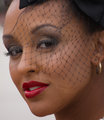
I have no idea as to how to do this, I have tried several obviously wrong ways and the net either disappears or looks blurry. How do you do it so that the net is still sharp but the face is edited?
The painful method: Select tool to select the hat net, then invert selection, now you have everything but the hair net. Now hold the freehand lasso down to get "- symbol" and deselect the backdrop that you just have her face and neck. Save selection. Feather selection (might take a little trial and error) and do your edits.
The easy method:
Topaz Remask....although I STILL have not been able to effectively use it for the really detailed work even after watching the tutorials. If you can master it, good for you!!!. ....P.S. if you do can you teach me what the heck I am doing wrong?
It really looks like a pain in the arse doesn't it. I haven't got TRM, I might have to go the painful way, then the really painful way of doing it individually, eeeekkkk
The painful way was hard, now I am going the really painful way and doing each individual square eeekkk will post end shot (maybe)
The really easy way is portrait professional. I gave it a try (I have a much older version and they have newer and better versions) and it worked great. I'm pretty sure they have free trials.
eta: And I didn't stop and play with it, this was just default settings.
The really easy way is portrait professional. I gave it a try (I have a much older version and they have newer and better versions) and it worked great. I'm pretty sure they have free trials.
eta: And I didn't stop and play with it, this was just default settings.
OOO I have that impulse buy! I going to try it, the squares are killing me, but it is not taking as long as I thought it would this way, just got a cramp in my finger lol
The really easy way is portrait professional. I gave it a try (I have a much older version and they have newer and better versions) and it worked great. I'm pretty sure they have free trials.
eta: And I didn't stop and play with it, this was just default settings.
OOO I have that impulse buy! I going to try it, the squares are killing me, but it is not taking as long as I thought it would this way, just got a cramp in my finger lol
If you buy it make sure you track down the thread with the discount codes. I think it's $50 off.
the auto mask feature works quite well in lightroom, im an aperture user but out of some sadomasochistic idea i got lightroom for my other computer and have been learning it, did a nude shoot with a girl wrapped in fairy lights and thats how i did it after messing around trying to do it by hand.
Thanks guys, so what it boils down to, whatever way you process under a net, there does not seem to be an easy way to do it. Unless you get someone else to do it for you!!! lol Or not wear a net!
I am going to try it all the ways that where mentioned to see if I can nail it down then let you know!