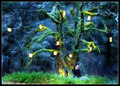
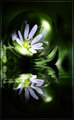
I have the hankerin' to do some fairy tale type forest shots similar to my shot of Laine as Little Redcap or myself as Rip Van Winkle:
It's funny the inspirations you get, but on a little drive home yesterday I happened to hear a song on NPR by a group called "Peatbog Fairies". I envision a dusky, moody forest path with glowing orbs sprinkled here and there. My question is how best to make the voluminous light in photoshop. I think I'll do some of the work at the site with various light sources (candles, lanters, etc), but I'm guessing they aren't going to glow like I want them to. I'm only so good at blending modes and wondered if there was a particular mode suited for this?
Well, that's not bad. What I'm thinking of though is how to change the quality of a sphere of light so that the colors behind it change from cool tones to warm ones. What blending modes do I use to accomplish this?
I guess it depends how you picture fairy lights as looking, but I imagine soft glowing orbs, like a pool of fireflies. Those can be made fairly easily by taking an isolated light source and hitting it with strong gaussian blur and perhaps a bit of noise if you like it more particular. If you assign it to a lighten level it works pretty well.
I guess it depends how you picture fairy lights as looking, but I imagine soft glowing orbs, like a pool of fireflies. Those can be made fairly easily by taking an isolated light source and hitting it with strong gaussian blur and perhaps a bit of noise if you like it more particular. If you assign it to a lighten level it works pretty well.
I think this is pretty good inspiration for what I'm looking for. The glow of the orb does not necessarily need to be opaque and I'd actually think it was cool if it wasn't.
Thanks! I will. (and sorry about the big picture, but does anybody really feel limited by their bandwidth these days?) I probably won't be able to get to my forest path at dusk or dawn until this weekend.
Thanks! I will. (and sorry about the big picture, but does anybody really feel limited by their bandwidth these days?) I probably won't be able to get to my forest path at dusk or dawn until this weekend.
It's not a question of bandwidth -- it screws up the thread display for people who don't have humongously wide monitors, so you have to scroll sideways just to read the posts.
Jason I don't think your looking for this ...I've been looking in my Elements magazine and they have an article on how to do that but roz had that picture...
You should easily be able to create them by using a splatter brush. Create several new layers for this. That way you can keep the shades of color separate and also have a top layer for the highlights. Start by choosing your base color and create a single splat using a roundish splatter brush. Then on separate layers paint your other shades using a more conventional brush tip or one that has the type of strokes you want to see in the orb. If you keep each color separate you can then blend them in later to create some depth or transform them individually by using the smudge tool, liquidfy, warp or whatever to get the shapes you want. You'll probably want to add a glow effect afterwards.
Or for the lazy, just search for some free clip art that gives you the basic shape and color depth you want and go from there.
Also, you can probably find something at PSD Tuts+
I have orbs, real life orbs. they are very thin glass bowls, kinda look like old fashioned fish bowls, the biggest size is about 10x10 and decreases from there. You can hang them, stick different lights in them and have orbs. you can buy them from me!~ they will work just like your picture you posted