Does anyone who uses Mozilla have trouble connecting to certain websites like for examlpe Flickr, I always get this error message --Sorry, we can't find "www.flickr.com". Please check the spelling of the web address.
I've googled the problem but can't seem to get help !
I don't think that is a browser issue. More likely, you are having problems with name resolution of the various sites. This might be a problem with connecting to your internet provider's DNS server.
Try using an alternate DNS server, like Open DNS. If the problem goes away, then the issue was contacting the DNS servers of your internet provider.
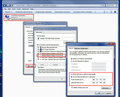
Following are the IP adresses for Open DNS, and a screen shot showing where to make the settings. (Windows 7 screenshot, but XP and Vista will be similar)
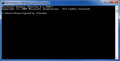
I get to that bit, to clear the memory, and nothing happens !
Not sure what you are doing. Is that instructions on the opendns site? That looks like they are having you open a dos prompt in order to clear the DNS cache from the command line. Not totally necessary.
All you should have to do is go into your network connection properties, as in my screenshot, and set the opendns addresses as your DNS server. The default is to use the one at your ISP.
All you should have to do is go into your network connection properties, as in my screenshot, and set the opendns addresses as your DNS server. The default is to use the one at your ISP.
Since they only give two slots for DNS server addresses (Macs have/had unlimited) would it make sense to put the ISP's primary DNS in the first slot and the OpenDNS address in the second?
All you should have to do is go into your network connection properties, as in my screenshot, and set the opendns addresses as your DNS server. The default is to use the one at your ISP.
Since they only give two slots for DNS server addresses (Macs have/had unlimited) would it make sense to put the ISP's primary DNS in the first slot and the OpenDNS address in the second?
I think that would only be effective (maybe) if the ISP's DNS server was unreachable - not if it was reachable, but slow or faulty.
What that does is to clear the previous DNS information (that was obtained from your ISP's server) so that all new connections will use the Open DNS system to find the web site you are trying to get to.
My Firefox will not load today either. I'm blaming it on the website I have set as "Home", which is my verizon email. Won't load at all - comes up with the crash report. Verizon has been notorious lately with screwing things up, so I figured they were just going through some cycle again. However, I can load Verizon just fine with IE.
Ok. Just tried something. Right-click on Mozilla icon and selected Firefox Options. Changed my homepage to yahoo.com. When I started Firefox this time it still crashed. Same thing with right-click and "Safe Mode". Something weird going on.