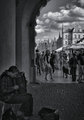
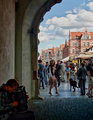
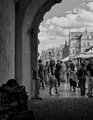
How would you edit this photo and why would you chose to edit it in this particular way? What would you like to emphasize and what title would you give to it?
I am very interested in this. I just started learning Silver Efex and wonder how to use it in the best way. My edits so far:
The version I posted in SC used unmodified Soft Skin
Soft Skin with a bit more contrast and vignette
This one uses Holga
Which one is the best of my 3 ideas or is there a better way?
I didn't get any better out of this shot. Editing steps are in the notes.
Did you shoot in RAW? This is the sort of shot that I would do with two raw conversions, one for the outside and one for the inside. Then layer them together and mask.
I didn't get any better out of this shot. Editing steps are in the notes.
Did you shoot in RAW? This is the sort of shot that I would do with two raw conversions, one for the outside and one for the inside. Then layer them together and mask.
Thanks, Steve. I edited RAW file in Viveza first then put the result into Silver. Your edit looks dark on my monitor. Is it dark on yours? I have calibrated mine with Spyder some time ago but maybe I need to redo it.
I opened the original in Adobe Camera Raw and made two versions; one processed for the foreground and one for the city view. I dropped a copy of the foreground image on top of the city image, then selected the view through the archway and deleted that, letting the other version show through. I processed each layer with some curves to make it be close to what I wanted. Then I created a flattened version on a single layer and ran THAT through Nik HDR Efex Pro for a little tone mapping. I selected for the foreground cobblestones next, and created a multiply layer with the selection loaded and ran a black-to-transparent gradient on that.
The whole thing was rotated, skewed, and cropped.
The B/W version I did in Nik Silver Efex Pro with no preset, pretty basic tweaks. Used Green Filter at about 30%, mostly. A little brightness, a little contrast, just some basic tweaks.
I opened the original in Adobe Camera Raw and made two versions; one processed for the foreground and one for the city view. I dropped a copy of the foreground image on top of the city image, then selected the view through the archway and deleted that, letting the other version show through. I processed each layer with some curves to make it be close to what I wanted. Then I created a flattened version on a single layer and ran THAT through Nik HDR Efex Pro for a little tone mapping. I selected for the foreground cobblestones next, and created a multiply layer with the selection loaded and ran a black-to-transparent gradient on that.
The whole thing was rotated, skewed, and cropped.
The B/W version I did in Nik Silver Efex Pro with no preset, pretty basic tweaks. Used Green Filter at about 30%, mostly. A little brightness, a little contrast, just some basic tweaks.
R.
Thanks, R. Very high quality work. Does the color have the same mood as the B&W? I was trying to capture the mood.
I stumbled on one of your original versions before I knew about the context of this thread and I liked it. The connection between the accordionist and the woman looks like the scene from a film, or more correctly a play with the city behind a painted backdrop. I think there is an artistic decision to be made here - do you want to bring out the splendour of the scene and ensure that the maximum information is drawn from the image or do you want to emphasise a story involving the people. I think the latter is more interesting.
I may have a go later (on a mobile device at the moment).
Some tonal contrast-colour contrast- Viveza to lighten the busker- bi colour filter to add a bit of blue to sky and a warmer tint to the stonework- then some orange filter, vignette and slight split tone in Silver fx for the b/w. They are both probably a bit over-cooked to be honest.
In general, before the b&w conversion, it's usually a good idea to make adjustments in Viveza 2. Then, I tonemapped in HDR Efex Pro. Removed noise with Dfine2. Then, converted to b&w in SilverEfexPro. (SilverEfexPro 2 has more fine tuning features.)
The Silver Efex Pro adjustments were not based on any presets. I don't find those very helpful. I think one is better served by starting with the default neutral and making custom adjustments.
Thanks everyone! All great work. It is interesting to read how approaches to PP vary from person to person. I am still in early days of learning Nik software so this is all very helpful.
PS Special thanks to Art for his sax playing Godzilla! :)