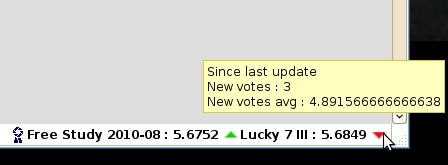
I have created a plugin to update and display the score in firefox's status bar.
Here is a screenshot of the plugin:
- optional automatic update, minimum delay of 30 seconds
- manual update by clicking on the plugin
- display the number of votes, views and favorites (number of comments soon) in the score tooltip
- display up/down arrow when your score goes up/down
- number of votes since last update and their average in up/down arrow tooltip
- Preferences menu is on the right click.
You just need to log on DPC so the addon can get the datas from the front page.
No datas are stored, there's no communication with another server than DPC. This is just a new way to display the DPC front page in Firefox.
Please post here bugs, problems you meet. And also what you would like to have in a future version.
______________ Known bugs v1.0.7 _____________
- (Fixed in 1.0.8) automatic update don't lauch itself after saving preferences. Temporary solution : a manual update will create the timer
______________ Known bugs v1.0.8 _____________
- (Fixed in 1.0.9) not working with free accounts (registered users)
______________ Known bugs v1.0.9 _____________
Still no bugs...
I'm a little confused. I received a new vote a couple of minutes ago, but the display in the status bar still hasn't changed.
You can click on the score to force update.
Else there is an automatic update ... each hour by default. Change it in the preferences (right click>preferences) if you want a fast automatic update.
Personally I prefer to disable automatic update, and just use it as an update button.
I'm a little confused. I received a new vote a couple of minutes ago, but the display in the status bar still hasn't changed.
You can click on the score to force update.
Else there is an automatic update ... each hour by default. Change it in the preferences (right click>preferences) if you want a fast automatic update.
one suggestion (that I used in my monitor program). reduce the resolution of the average score to something like what's on the site.
any chance of a chrome version? :)
The main problem is that it will always update your score, even when you are not in front of your computer.
If you want (like me) to always see the evolution of the score since the last update, disable automatic updates and click on the extension (it's better to have the indicators).
If you just want to have the current score up-to-date in the status bar, keep the automatic update.
one suggestion (that I used in my monitor program). reduce the resolution of the average score to something like what's on the site.
any chance of a chrome version? :)
I'll might fix the font size in a future version.
About chrome, I don't know. It should be easy to use this code for chrome, but I have to learn how to create an addon... and right now my boss just want to work on firefox plugins. :)
If I have to do it with my job ... I'll do it for sure.
I turned the automatic update on -- but it hasn't updated. The time is set for 360 seconds, the new vote came in 7 minutes ago, and it hasn't updated yet. Do I need to restart firefox to have the automatic vs manual kick in?
You don't need to restart firefox to set your preferences.
In the version you use, the text field to the update time is short.
Your 360s might be 3600s (the default update time).
You should go back in preferences, change the time and save... it should update when saving, the using the delay to update.
Ok wendy, you found a bug:
the addon don't update when you close the preferences window. So the automatic update is not launched.
You have to update it manually once to lauch the timer for the automatic update.
Ok wendy, you found a bug:
the addon don't update when you close the preferences window. So the automatic update is not launched.
You have to update it manually once to lauch the timer for the automatic update.
Do I get a prize for finding a bug?
This really is pretty cool. I like the little green up arrow. :)
Now can you right one that shows up on my windows taskbar? That would be the ultimate -- see new votes as they come in while you're working in photoshop cleaning up the pictures for the next challenge.
Do I get a prize for finding a bug?
Now can you right one that shows up on my windows taskbar?
If you do a great macro of the bug, you might have a ribbon :D
Showing indicators in the window taskbar is a great idea, but I don't think it's easy to do. I'll search that when I'll find some time.
you should develope an iPhone app and sell it. Of course, you might need to clear that with the DPC peeps.
I could put this code in a website that could do almost the same thing.
It should be better to do an android one ... because there is widgets in this system.