| Author | Thread |
|
|
04/21/2009 09:32:42 AM · #76 |
Originally posted by bmartuch:
Originally posted by colorcarnival:
Originally posted by Bear_Music:
Originally posted by bmartuch:
I know that these Topaz adjustments can be saved just like actions in PS, but can they be sent to other people like actions can? It would be cool to swap some of these. |
Yup. Just find 'em in the folder Topaz stores the presets in, and send 'em on their way. Mine's at C:\Program Files\Topaz Labs\Topaz Adjust 3\Presets
R. |
Here's a link to some more: ATNcentral . Some fun ones are there.
I've learned a lot from the Topaz Flickr group. |
Thanks Michelle and Bear!! |
Thanks for the link. |
|
|
|
04/21/2009 09:41:41 AM · #77 |
|
Any room for one more? I have been thinking of trying the 30 day trial for a while, but keep putting it off - this is just the motivation I need. |
|
|
|
04/21/2009 10:11:56 AM · #78 |
Originally posted by SaraR:
Any room for one more? I have been thinking of trying the 30 day trial for a while, but keep putting it off - this is just the motivation I need. |
Not my challenge, and I'm not even a princess, but I say yeah, get ready to download that sucker and join in. Fair warning - it's wickedly addicting. So whilst you're using the trial, put pennies in a jar and save up for the end of the month when you'll buy the stupid thing because the trial just makes you realize you can't live without it. Evil... very evil.
OH! And my envelope came today!! I LOVE the card! That shot printed up beautifully! Love the card holder, too - you're so sweet! Thank you ever so kindly! |
|
|
|
04/21/2009 02:44:45 PM · #79 |
Originally posted by Melethia:
Requesting Princess of Pigeons, if that's not too presumptious. And I may actually try to shoot and Topaz at least one pigeon during the month of May. |
Let's make it more formal then: HRH Melethia, the Princess of Pigeons :)
Where do the Walkies fit in? |
|
|
|
04/21/2009 03:09:15 PM · #80 |
Originally posted by colorcarnival:
Originally posted by Melethia:
Requesting Princess of Pigeons, if that's not too presumptious. And I may actually try to shoot and Topaz at least one pigeon during the month of May. |
Let's make it more formal then: HRH Melethia, the Princess of Pigeons :)
Where do the Walkies fit in? |
She's WAY too elevated to be a princess, though. Perhaps the "Empress of Pigeons"? That has a nice ring to it... Or perhaps "Light Colonel of the Pigeon Air Forces"...
R.
Message edited by author 2009-04-21 15:09:32. |
|
|
|
04/21/2009 03:10:25 PM · #81 |
Originally posted by bmartuch:
Originally posted by Bear_Music:
Originally posted by colorcarnival:
Originally posted by bmartuch:
Does this mean that we have to refer to Michelle as "Her Royal Highness"? |
Seriously, whatever works, as long as i have all the power hehehe |
I want to be addressed as the "Lord of Light", okay?
R. |
Lord of Light???? Isn't that LOL? |
You got it, dude! :-) Jejeje™
R. |
|
|
|
04/21/2009 05:29:10 PM · #82 |
|
Is Topaz allowed in basic editing? |
|
|
|
04/21/2009 05:30:11 PM · #83 |
Originally posted by sempermarine:
Is Topaz allowed in basic editing? |
I'm pretty sure it's not. |
|
|
|
04/21/2009 05:49:41 PM · #84 |
Originally posted by Kelli:
Originally posted by sempermarine:
Is Topaz allowed in basic editing? |
I'm pretty sure it's not. |
Definitely not.
R. |
|
|
|
04/21/2009 06:08:36 PM · #85 |
Originally posted by Bear_Music:
Originally posted by Kelli:
Originally posted by sempermarine:
Is Topaz allowed in basic editing? |
I'm pretty sure it's not. |
Definitely not.
R. |
Thanks! |
|
|
|
04/21/2009 06:17:26 PM · #86 |
Originally posted by sempermarine:
Originally posted by Bear_Music:
Originally posted by Kelli:
Originally posted by sempermarine:
Is Topaz allowed in basic editing? |
I'm pretty sure it's not. |
Definitely not.
R. |
Thanks! |
But it's great for advanced editing! Are you gonna join us? |
|
|
|
04/21/2009 07:36:36 PM · #87 |
Originally posted by colorcarnival:
Originally posted by sempermarine:
Originally posted by Bear_Music:
Originally posted by Kelli:
Originally posted by sempermarine:
Is Topaz allowed in basic editing? |
I'm pretty sure it's not. |
Definitely not.
R. |
Thanks! |
But it's great for advanced editing! Are you gonna join us? |
I'm in negotiation with myself over the matter. I've downloaded the trial version and I really enjoy it, but I don't know if I will have the time needed to participate. |
|
|
|
04/21/2009 08:36:09 PM · #88 |
I'm afraid I could get addicted to this.
  |
|
|
|
04/21/2009 09:18:49 PM · #89 |
OK, this is my last one for the night. I promise!!!
 |
|
|
|
04/21/2009 11:10:36 PM · #90 |
okay, here is my first attempt with Topaz. What do you think? It's a cool product and I enjoyed working on this shot.

The Soap |
|
|
|
04/21/2009 11:31:02 PM · #91 |
|
I have a request for the more robust users of TA. You know who you are...are you using presets, then tweaking? Do skip the presets? Anyone interested in posting an example with your processing workflow? |
|
|
|
04/22/2009 12:05:24 AM · #92 |
|
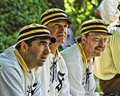
Nice work on those, Bob! Love the way it brought out the whiskers, and really love those uniforms! Ben, I pretty much always use the presets and rarely tweak. It's the tweaking I need to learn - what does what and so forth. My two favorite presets are "photo pop" (stays fairly natural) and "portrait drama" (definitely more processed-looking). |
|
|
|
04/22/2009 12:08:14 AM · #93 |
|
Not a Topaz question, but slightly related - for those that use Nik Silver Efex - legal for basic without vignetting or no? Given the way it's applied, I'm not entirely sure (there's a fill layer in there, and a "stamp visible" thing....) |
|
|
|
04/22/2009 12:37:02 AM · #94 |
I don't have Nik plugins.
I like the dramatic and enhance contrast presets usually at 15% fill. Portrait drama works well. |
|
|
|
04/22/2009 07:06:42 AM · #95 |
Originally posted by Melethia:
Not a Topaz question, but slightly related - for those that use Nik Silver Efex - legal for basic without vignetting or no? Given the way it's applied, I'm not entirely sure (there's a fill layer in there, and a "stamp visible" thing....) |
Deb, just a guess (and I don't have it), but I'd think it's not legal for basic since virtual photographer isn't. I think they both work about the same. |
|
|
|
04/22/2009 07:11:30 AM · #96 |
Originally posted by bspurgeon:
I have a request for the more robust users of TA. You know who you are...are you using presets, then tweaking? Do skip the presets? Anyone interested in posting an example with your processing workflow? |
I use presets (usually on layers) and adjust the mode and/or opacity. On some occasions, it looks fine with just the preset the way it is, on others I play with the sliders to get what I want. Usually I do a noise adjustment on my first and last layer (because I rarely use just one). |
|
|
|
04/22/2009 07:27:13 AM · #97 |
Originally posted by Melethia:
I pretty much always use the presets and rarely tweak. It's the tweaking I need to learn - what does what and so forth. My two favorite presets are "photo pop" (stays fairly natural) and "portrait drama" (definitely more processed-looking). |
I've been tweaking a little more but for presets, I think Spicify is really cool and I also like Mild Color Pop which still keeps it kind of normal. |
|
|
|
04/22/2009 08:52:23 AM · #98 |
Originally posted by bspurgeon:
I have a request for the more robust users of TA. You know who you are...are you using presets, then tweaking? Do skip the presets? Anyone interested in posting an example with your processing workflow? |
I don't really know what I am going to do with the photo until I start playing with it. BUT for the most part...
If I want a smoother effect, I run the photo thru noiseware first.
Then I select my preset - (again, depends on what I want to achieve)
And I always tweak.
Then I usually lower the opacity of the layer some to tone down the effect and let some of the original blend thru.
...hmmm how's this for a kind of vague answer? |
|
|
|
04/22/2009 09:04:13 AM · #99 |
|
Count me in! This should be fun and I need to step away from the regular challenges anyway. |
|
|
|
04/22/2009 10:32:27 AM · #100 |
|
Yay for free trials! I'll happily join in this one. |
|
Theme:
Classic /
Light /
Dark
Home -
Challenges -
Community -
League -
Photos -
Cameras -
Lenses -
Learn -
Help -
Terms of Use -
Privacy -
Top ^
DPChallenge, and website content and design, Copyright © 2001-2026 Challenging Technologies, LLC.
All digital photo copyrights belong to the photographers and may not be used without permission.
Current Server Time: 09/24/2026 08:35:15 PM EDT.




