To attach an image from the site, you right click on the thumbnail photo and get the image number. Then click on the image icon above the message entry area when you reply and enter the thumbnail number. To include an off site photo, you need to host someplace like photobucket. At photobucket there will be the opportunity to copy the link to your clipboard. Once you do that, you can click on the hyperlink icon above the message entry area, and copy the hyperlink address. What you cannot do, which it looks like you tried to do, is to add the image directly to the message. The site isn't set up that way.
[quote=DianeS] Hi,
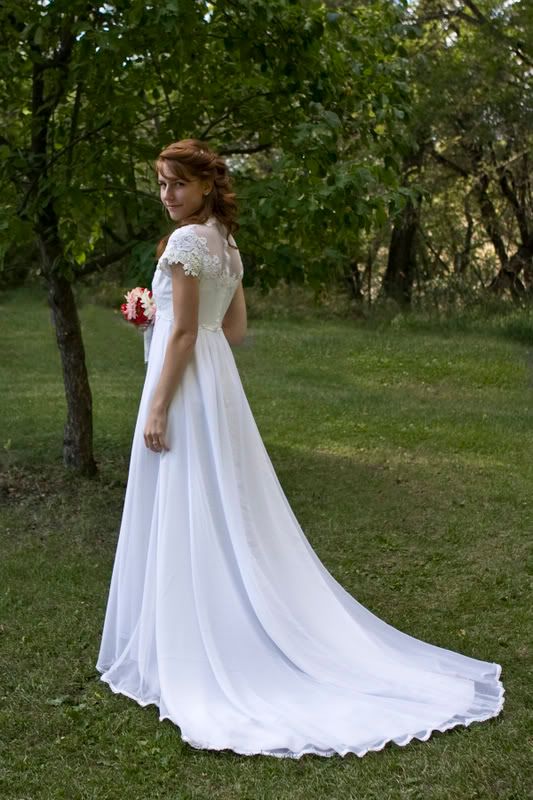
I'm curious how you would edit this! This is a photo from my first wedding shoot, and I'm trying to better my editing skills.
I feel that what you have posted it fine other than the obviously stated bright spot in the dress. Is this the original? or a post production? If its post then I would work on the dress a little to get more detail in the dress. Then I would 'lasso' out her face and work on the exposure with it as well. Truly a wounderful print.
ETA that I changed the image to show the dress more.
What a difference!! Not sure I like the loss of grass / background color, but that probably could be added back in a bit - but what a difference you've made in her face and dress. Guess I've got a lot to learn about editing...
-Ran through ACR (Exposure,Recovery,contrast)
-Levels
-Slight S-Curve
-Curves level masked only for her upper body
-Boosted contrast slightly
-Desaturated the green
-Burned the bottom of the dress
-USM (this did not work too well working from a low-res jpg, but I still like it better than without)
-Crop
Message edited by Manic - please keep images under 500px and 30kb, or post links or thumbs instead.
Tighter Crop
Adjust > Clarity (5)
Very Light Lucis Art Layer
Very Light(8)Perfectum (smoothing) adjustment
White Vignette Layer
Eraser the Young Lady through Vignette
Merge all done
Clarify (5)
Very Light USM