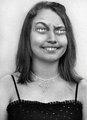
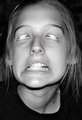
It's said the eyemouth is the window to the soul. Certainly, eyemouths are compelling and mysterious. Eyemouths are also among the most challenging features to photograph well. Give us a look at your best eyemouths, animal or human.
How are you getting your mouth eye's to look so realstic?? When I try, it's an obvious cloning job. How do you reduce the size and blend them in like that?
How are you getting your mouth eye's to look so realstic?? When I try, it's an obvious cloning job. How do you reduce the size and blend them in like that?
Here's how I'm doing it:
1. New layer
2. Select mouth area with polygonal selection tool, it's OK to be rough, include some extra area for play
3. Selection - Inverse - Delete
4. Selection - Deselect (now you have a new (top) layer which is just the mouth area)
5. Change layer opacity to 50% to make fitting easier
6. Move to cover eye
7. Edit - Free Transform, to fit corners of mouth to corners of underlying eye
8. Change layer opacity back to 100%
9. Soft-edged eraser tool to erase & blend edges of mouth until satisfied
10. Copy that layer and move to other eye, can change opacity to help and touch up with eraser
11. If needed, eyemouth layers can be adjust independantly for Levels, dodge & burn etc, for shadowy side of face.